
VoIP call-quality or connectivity problems can originate in the local network, internet path, firewall or router, endpoint, provider platform, carrier interconnection, configuration, or the far end of the call. Jitter, packet loss, and latency are useful measurements, but they are not the only evidence. A structured test should isolate each layer before assigning a root cause.
What are the most common VoIP problems affecting call quality?
VoIP, formally known as Voice over Internet Protocol, converts voice into data packets and sends them across an IP network. When that path performs poorly, audio can degrade in recognizable ways. Acceptable measurements vary by codec, provider, endpoint, measurement method, and business requirement, so use the platform documentation and a measured baseline.
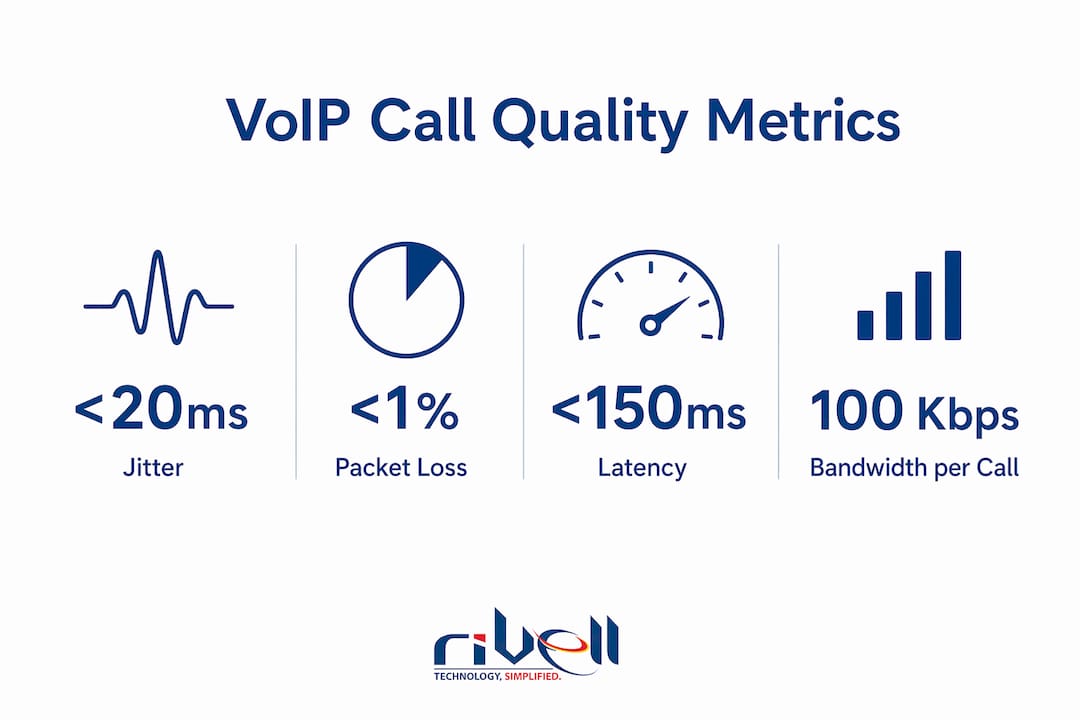
Jitter is the variation in packet arrival time. When packets arrive unevenly, the audio sounds choppy or robotic. Jitter above 30ms causes noticeable audio degradation, and the 2026 standard requires jitter below 20ms for acceptable call quality.

Packet loss is the percentage of packets that do not reach their destination. Real-time voice usually cannot wait for ordinary retransmission, so loss can affect audio. The user impact depends on the codec, loss pattern, concealment, path, and provider design. Compare measurements with the supported requirements.
Latency is the round-trip delay between speaker and listener. The 2026 standard sets the acceptable ceiling at 150ms. Latency over 300ms breaks natural conversation flow and causes people to talk over each other.
| Metric | Acceptable threshold | Problem threshold |
|---|---|---|
| Jitter | Below 20ms | Above 30ms |
| Packet loss | Below 1% | Above 3% |
| Latency (round trip) | Below 150ms | Above 300ms |
Network speed alone does not guarantee good call quality. A 100 Mbps connection with high jitter will produce worse calls than a 10 Mbps connection with consistent, low-latency delivery. Consistent latency and prioritized voice traffic matter far more than raw bandwidth numbers.
Pro Tip: Run a VoIP-specific network test during your busiest hour of the day, not at 2:00 AM. Jitter and packet loss problems almost always appear under load, not during idle periods.
Which software and hardware misconfigurations cause voice over IP issues?
Configuration changes can resolve some call-quality complaints, but the result depends on the diagnosed cause. Measure the path and test an approved change before purchasing hardware, increasing bandwidth, or assigning the fault to one layer.
The most common configuration problems include:
- Incompatible SIP ALG behavior. Some router implementations rewrite SIP traffic in ways that conflict with a provider, while other designs may expect a supported gateway function. Follow the phone provider and firewall vendor guidance, record the current state, and test signaling and media before and after an approved change.
- Missing or incorrect QoS settings. QoS tells your router to prioritize voice packets over file downloads and video streams. The correct configuration marks voice traffic with DSCP EF 46 and prioritizes UDP ports 5060 (SIP) and 10000–20000 (RTP). Without this, a single large file upload can destroy call quality for everyone in the office.
- NAT and firewall session timer mismatches. If your firewall closes idle sessions faster than your SIP provider’s keepalive interval, calls drop at fixed intervals. Calls dropping at consistent time intervals almost always trace to NAT timeout or SIP session timer mismatches, not to the provider.
- Double NAT configurations. Running two routers in sequence creates double NAT, which confuses SIP registration and causes intermittent failures. This is common when a business adds a second router behind an ISP-provided modem.
- Outdated firmware. Router and phone firmware bugs cause registration failures and audio codec errors. Manufacturers release patches that fix known VoIP compatibility issues, and skipping updates leaves those bugs in place.
Software and network settings such as SIP ALG behavior, traffic prioritization, NAT, timeouts, and firmware belong in the diagnostic path. Hardware, cabling, endpoints, wireless conditions, provider service, carrier routing, and capacity can also be responsible.
Pro Tip: Before touching any hardware, log into your router and check three things in order: SIP ALG status, QoS rules, and NAT timeout values. Fix those first. You will resolve most problems without spending a dollar.
How do you systematically troubleshoot VoIP connectivity issues?
Systematic troubleshooting separates the network layer, the device layer, and the provider layer. Skipping straight to calling your provider wastes time when the problem is a misconfigured router sitting three feet away.
Test wired versus wireless. Plug a VoIP phone or softphone directly into the router with an Ethernet cable. If call quality improves immediately, the problem is Wi-Fi interference or signal strength, not your internet connection. Wireless networks introduce variable jitter that wired connections eliminate.
Check router and firewall settings. Confirm SIP ALG is disabled. Verify QoS rules exist and correctly prioritize voice traffic. Review NAT timeout settings and compare them to your SIP provider’s recommended keepalive interval. Check that UDP ports 5060 and the RTP range (10000–20000) are open.
Measure network path quality to your provider. Use a tool like PingPlotter or a VoIP-specific test to measure jitter, packet loss, and latency over a sustained period during peak usage hours. Packet loss above 0.5% indicates a problem. A single snapshot test is not enough. Run it for at least 30 minutes.
Separate SIP signaling from RTP media problems. This distinction saves hours of troubleshooting. A call that rings but has no audio points to RTP and firewall port issues. A call that fails to connect at all points to SIP registration problems. These require different fixes, so identifying which symptom you have first is critical.
Involve your provider with exact data. If upstream issues are suspected, contact your SIP provider with specific call timestamps, affected phone numbers, and your network test results. Vague reports like “calls keep dropping” get slow responses. Specific data gets faster resolution.
Common enterprise IT bottlenecks follow the same pattern as VoIP issues: the root cause is almost always in the configuration or network layer, not the application itself.
Pro Tip: Keep a call log with timestamps whenever a VoIP issue occurs. Note the time, the affected extension, and the symptom. That log becomes your most valuable diagnostic tool when escalating to a provider or IT team.
What practical steps fix and prevent VoIP call quality problems?
Fixing voice over IP issues permanently requires addressing both bandwidth and configuration. Here are the most effective steps for small businesses:
- Calculate concurrent-call capacity. Obtain the bandwidth requirements for the selected provider, codecs, signaling, encryption, and endpoints. Measure peak simultaneous calls and competing traffic, then validate both primary and backup paths with appropriate headroom.
- Use business-grade equipment. Consumer-grade routers often have QoS features that are misconfigured or disabled by default, causing severe voice packet delays under load. Business-grade routers and switches support proper DSCP marking, VLAN segmentation, and reliable NAT handling.
- Disable SIP ALG on every router in the path. This single change resolves a large share of one-way audio and dropped call complaints. Check both your ISP-provided modem and any secondary router you manage.
- Segment voice traffic onto a dedicated VLAN. A voice VLAN isolates phone traffic from general office data. File downloads, video streaming, and software updates cannot interfere with call packets when they run on separate network segments.
- Use wired connections for phones whenever possible. Wired Ethernet eliminates the jitter variability that Wi-Fi introduces. For desk phones, this is straightforward. For softphones on laptops, a USB Ethernet adapter costs under $20 and makes a measurable difference.
- Set up proactive monitoring with alerts. Proactive monitoring with alerts on jitter and latency exceeding thresholds helps detect issues before users start complaining. Catching a degrading network link at 11:00 AM beats discovering it during a client call at 2:00 PM.
| Fix | Impact |
|---|---|
| Disable SIP ALG | Resolves signaling failures and one-way audio |
| Configure QoS with DSCP EF 46 | Prevents call degradation during peak usage |
| Dedicate 100 Kbps per concurrent call | Eliminates bandwidth-related choppy audio |
| Segment voice onto a VLAN | Isolates voice traffic from data congestion |
| Enable network monitoring alerts | Catches degradation before calls are affected |
Use the VoIP vs. landline comparison to understand how network, power, emergency-location, device, and support dependencies differ. Then review the provider-specific VoIP business advantages that match the required plan and licenses.
What I’ve learned from years of VoIP troubleshooting
The most frustrating pattern I see is businesses spending money in the wrong place. They upgrade their internet plan, buy new phones, or switch providers, and the calls still drop. Then they call us, and within an hour we find SIP ALG enabled on a router that has been sitting in the closet for four years.
Do not rule out either the platform or the network before collecting evidence. High headline bandwidth can coexist with congestion, loss, delay variation, wireless interference, device load, or configuration faults. A modest connection can also support the required call load when the measured path, equipment, and provider requirements align.
Systematic diagnostics matter more than fast action. The businesses that resolve VoIP issues quickly are the ones that test methodically: wired versus wireless, signaling versus media, local network versus provider path. The ones that struggle are the ones that replace hardware based on guesswork.
Small businesses do not need enterprise-grade infrastructure to get reliable VoIP. They need correctly configured business-grade equipment, a basic understanding of QoS, and someone watching the network metrics. Those three things solve the problem in most cases. The investment is modest. The payoff in call reliability is significant.
For recurring issues, start with a repeatable evidence checklist: timestamp, affected users and calls, direction, endpoint, wired or wireless path, local and public addresses, provider status, logs, SIP response, media path, delay, variation, loss, recent changes, and test results. Escalate with that evidence when the fault crosses a support boundary.
— Ryan
How Rivell helps small businesses resolve VoIP issues for good
Persistent VoIP problems cost small businesses more than dropped calls. They cost client relationships and staff productivity.
Rivell’s managed IT services for small businesses cover the exact configuration and monitoring work that resolves most voice over IP issues: QoS setup, SIP ALG remediation, VLAN design, and proactive network monitoring with threshold alerts. Rivell takes full ownership of the IT environment so your team focuses on the business, not the phone system. With over 25 years of experience supporting New Jersey businesses across healthcare, professional services, and beyond, Rivell brings the systematic approach that turns recurring VoIP complaints into a solved problem. Reach out to learn how Rivell can stabilize your business communications.
FAQ
What causes most VoIP problems in small offices?
Check SIP ALG behavior, traffic prioritization, NAT timeouts, firmware, DNS, cabling, wireless conditions, capacity, endpoint logs, provider status, and the carrier path. The fix depends on the evidence, and not every issue can be resolved through configuration alone.
What are the acceptable thresholds for VoIP network metrics?
Measure delay, delay variation, packet loss, path changes, and available capacity during representative load. Compare the results with the selected provider, codec, endpoint, and application requirements. Avoid treating one set of thresholds as universal.
How do I know if my VoIP issue is a signaling or media problem?
If a call rings but has no audio, the problem is in the RTP media path, typically a firewall blocking UDP ports 10000–20000. If calls fail to connect at all, the issue is SIP registration, often caused by SIP ALG or incorrect credentials.
How much bandwidth does VoIP require per call?
Per-call bandwidth varies by codec, packetization, headers, encryption, provider design, and measurement method. Use the provider and equipment requirements, multiply by realistic concurrent calls, include overhead, and test under representative load.
Does disabling SIP ALG really fix VoIP problems?
Disabling SIP ALG resolves up to 30% of VoIP signaling problems, including dropped calls and one-way audio. SIP ALG modifies SIP packet headers in ways that break call routing, and most routers have it enabled by default.
Key takeaways
Network configuration errors such as incompatible SIP ALG behavior, missing traffic prioritization, or NAT and timeout mismatches are common diagnostic candidates. Provider, carrier, endpoint, software, cabling, wireless, and capacity issues also need to be tested.
| Point | Details |
|---|---|
| Configuration causes most failures | SIP ALG behavior, traffic prioritization, and NAT timeouts are diagnostic candidates, along with endpoints, circuits, provider service, and carrier routing. |
| Know your thresholds | Keep jitter below 20ms, packet loss below 1%, and latency below 150ms for clear calls. |
| Disable SIP ALG first | Turning off SIP ALG on your router resolves up to 30% of signaling problems immediately. |
| Separate signaling from media | No audio points to RTP/firewall issues; failed connections point to SIP registration problems. |
| Monitor proactively | Set alerts on jitter and latency thresholds to catch network degradation before calls are affected. |
