
If you can name your report type, point to a named owner for every Security control, and produce evidence trails on demand, you’re close to audit-ready. If any of those three things gives you pause, you’re not, and pushing forward anyway is how organizations end up with a qualified opinion or a report riddled with exceptions.
Here’s the blunt version: SOC 2 readiness isn’t a feeling, it’s a checklist with a pass/fail line. You need a locked scope, documented policies with named owners, and evidence trails covering the Security Trust Services Criterion (TSC) at minimum, since Security is the only mandatory category in either a Type I or Type II report. Everything else, from Availability to Privacy, is optional and depends on what your customers actually ask for in security questionnaires.
Before you do anything else, run this starter checklist:
- Lock your scope. Name the specific systems, products, data flows, and subservice providers (like AWS regions or payroll vendors) that fall inside the audit boundary.
- Assign named owners to each control area: access management, change management, monitoring, incident response, backups, and vendor management.
- Open an evidence repository today, organized by TSC and control, even if it’s just a structured folder tree in SharePoint or Google Drive.
- Pick your report type. Type I proves your controls are designed correctly as of a point in time; Type II proves they operated effectively over a period, usually 3 to 12 months.
- Schedule a mock audit roughly 90 days before your target observation window closes, so gaps surface while there’s still time to fix them.
Then take three actions this week: confirm who in your organization owns each control family, start collecting evidence now rather than backfilling it later, and calendar a scope review meeting before you write a single policy. Scope mistakes are the most expensive kind to fix mid audit.
Key Takeaways
SOC 2 readiness comes down to three disciplines working together: a locked scope, named control owners with real evidence trails, and automation that generates that evidence continuously rather than retroactively.
| — | Lock scope, assign named control owners, and open a structured evidence repository organized by TSC.
| 90 days | Build the control-to-evidence matrix, automate evidence collection, and begin remediating the highest-risk gaps first.
| — | Run a mock audit, close remaining exceptions, and engage a licensed CPA firm to schedule fieldwork.
| Automate early | Target automating 45% to 55% of Common Criteria controls to cut manual evidence work and reduce audit friction.
| Rivell’s role | Rivell’s managed monitoring, access management, and backup infrastructure generate Security control evidence as part of normal IT operations.
Table of Contents
- What Is SOC 2, and Why Does Type I vs. Type II Matter?
- What Are the Trust Services Criteria, and Which Ones Apply to You?
- What Does a Full SOC 2 Readiness Checklist Look Like?
- How Do You Run a SOC 2 Readiness Assessment?
- What Documentation and Evidence Do Auditors Actually Request?
- How Long Does SOC 2 Readiness Take, and What Drives the Cost?
- Who Can Actually Perform Your SOC 2 Audit?
- Why Do Most SOC 2 Readiness Efforts Fail, and How Do You Fix It?
- Should You Fast-Track a Type I or Build Toward Type II From Day One?
- How Rivell Supports SOC 2 Readiness Without Adding Headcount
- Where to Go Deeper on SOC 2 Preparation
- Frequently Asked Questions
- Sources
What Is SOC 2, and Why Does Type I vs. Type II Matter?
SOC 2 is an attestation report, not a certification, built around the AICPA’s Trust Services Criteria, a framework that defines how service organizations should manage customer data across security, availability, processing integrity, confidentiality, and privacy. An independent CPA firm evaluates your controls against those criteria and issues an opinion. There’s no pass/fail certificate to hang on the wall; there’s a report your customers’ security teams will actually read.
The Type I versus Type II distinction trips up a lot of first-timers. A Type I report evaluates whether your controls are designed appropriately as of a single date, like a photograph of your control environment. A Type II report goes further: it tests whether those controls operated effectively over an observation period, typically three to twelve months, which means your auditor is sampling actual evidence, actual tickets, actual log reviews, not just reading your policy documents.
Most enterprise buyers now expect a Type II report before they’ll sign a contract, since Type I only proves you built the machine, not that it ran correctly. If you’re under pressure to show progress fast, a Type I can buy you credibility while you accumulate the operating history a Type II demands. But don’t treat Type I as a finish line. Treat it as a checkpoint on the way to Type II.
What Are the Trust Services Criteria, and Which Ones Apply to You?
Security is the one TSC every SOC 2 report includes, no exceptions. The other four, Availability, Processing Integrity, Confidentiality, and Privacy, are optional additions you scope in based on what your service actually does and what your customers demand contractually.
Here’s what each one covers and where it shows up in practice:
- Security protects systems against unauthorized access. Sample controls: multi-factor authentication, role-based access provisioning, patch management cadence, and firewall/network segmentation rules.
- Availability addresses whether the system is operational and accessible as agreed. Sample controls: uptime monitoring, redundant infrastructure, and a tested business continuity/disaster recovery (BC/DR) plan.
- Processing Integrity confirms system processing is complete, accurate, and authorized. Sample controls: input validation checks, reconciliation processes, and error logging with resolution tracking.
- Confidentiality covers protection of information designated as confidential, think client contracts, source code, or trade secrets. Sample controls: data classification policies, encryption at rest and in transit, and need-to-know access restrictions.
- Privacy governs how personal information is collected, used, retained, and disposed of. Sample controls: privacy notices, consent tracking, and data retention/deletion schedules, all of which the AICPA’s privacy management framework outlines in more depth.
Adding TSCs beyond Security multiplies your evidence burden, not just your policy count. Every additional criterion means more controls to design, more artifacts to collect, and more sampling for your auditor to perform during fieldwork. Scope in only what your contracts and customer questionnaires actually require. A B2B SaaS company handling no sensitive personal data rarely needs Privacy in scope; a healthcare-adjacent platform almost always does.
What Does a Full SOC 2 Readiness Checklist Look Like?
This is the working document. It’s the core soc 2 readiness checklist your team will reference daily during preparation, and it starts with scope, not controls.
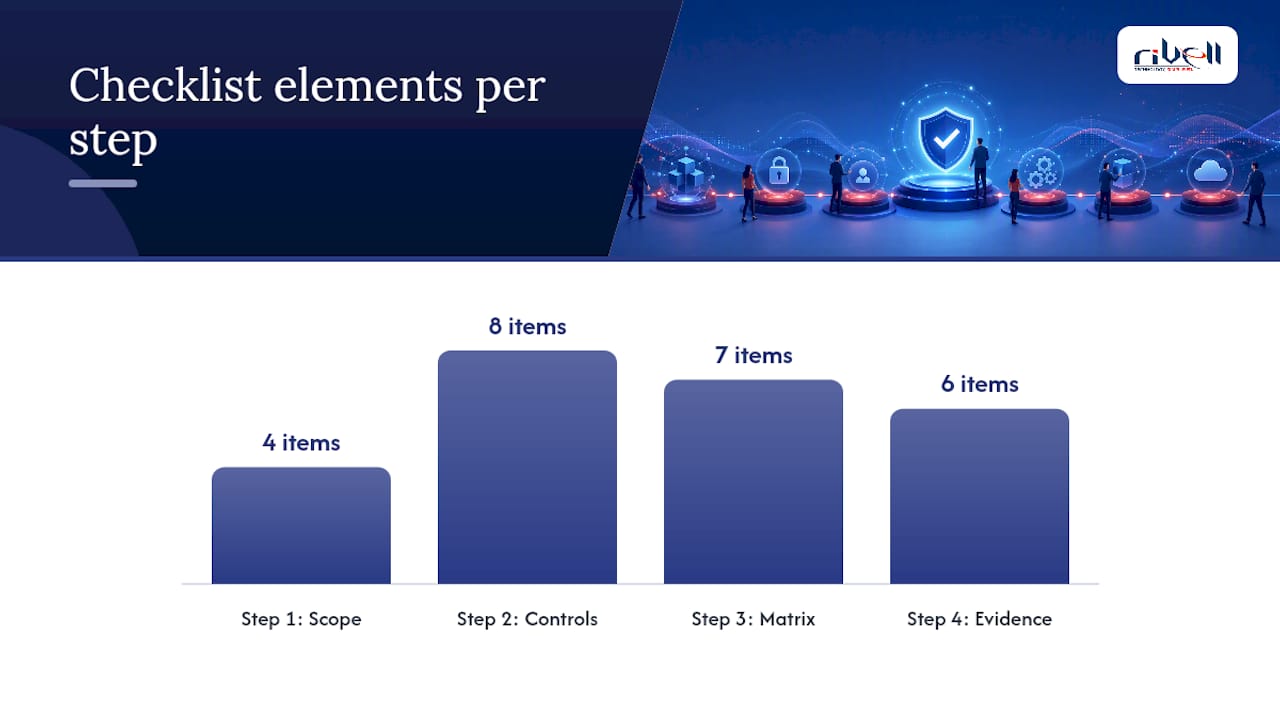
Step 1: Define scope and write the system description. Name every in-scope service, the data flows between them, and any subservice providers, cloud hosting regions, payment processors, or outsourced help desks that touch customer data. A vague scope statement is the single most common source of audit rework, since auditors will push back on ambiguity and expand fieldwork to compensate. A clear two-page scope diagram drawn up in week one saves weeks of confusion later, according to Soc2auditors.
Step 2: Build controls in a logical order, with named owners. Sequence matters. Access controls and encryption typically come first since they underpin everything else, followed by monitoring and logging, then change management, incident response, vendor management, backups, and business continuity planning. Every control needs one accountable person, not a team, not “IT,” a specific name. Rivell’s guidance on choosing the right access control provider covers how to structure this layer correctly from the start.
Step 3: Build a control-to-evidence matrix. This is the single artifact that makes or breaks fieldwork efficiency. Structure it with these columns:
| Column | Purpose |
|---|---|
| TSC reference | Which criterion the control satisfies (Security, Availability, etc.) |
| Control description | Plain-language statement of what the control does |
| Owner | Named individual accountable for the control |
| Artifact path | Where the evidence lives (ticketing system, log platform, folder path) |
| Automation status | Manual, partially automated, or fully automated collection |
| Last tested date | When the control was last verified as operating |
| Remediation due date | Deadline if a gap was found |
Missing an owner or artifact path in this matrix almost guarantees an audit exception, since SOC2Auditors.org’s compliance checklist notes that gaps in ownership are among the most predictable failure points auditors flag.
Step 4: Stage sample evidence for each core area. Auditors expect specific artifact types: access review logs with manager sign-off, MFA configuration screenshots, signed policy acknowledgments, change tickets tied to deployments, vulnerability scan results, and vendor risk assessments.
Pro Tip: Start automation and evidence collection before your observation period opens, not after. Retroactively reconstructing six months of access reviews or change logs is far harder than pulling them automatically as you go, and auditors can tell the difference between systematic evidence and evidence assembled the week before fieldwork.
How Do You Run a SOC 2 Readiness Assessment?
A readiness assessment is a structured gap analysis you run before the real audit begins, and it follows a repeatable seven-step framework:
- Scope the audit boundary: systems, data, and subservice organizations.
- Map controls to each in-scope TSC using the matrix described above.
- Inventory evidence you already have versus evidence you still need to generate.
- Score gaps using a simple maturity model (see below).
- Build a remediation plan with prioritized fixes and deadlines.
- Automate evidence collection wherever manual processes currently exist.
- Run a mock audit to simulate fieldwork before the real auditor arrives.
For scoring, keep it simple. A four-point scale works well: 0 = No control exists, 1 = Control exists but undocumented, 2 = Documented but not consistently followed, 3 = Consistently operating, 4 = Automated and consistently operating with evidence trail. Anything scoring 0 or 1 goes to the top of your remediation backlog; anything at 3 or 4 needs no immediate attention beyond ongoing monitoring.
Timing matters more than most teams expect. Start your readiness assessment several months before you want the observation period to open, giving you room to remediate gaps before the clock starts running on a Type II report. Roughly 85% of companies surface between 8 and 15 significant gaps once they run a mock audit near the end of that window, according to SOC2Auditors.org’s readiness framework, so don’t schedule your mock audit so late that there’s no runway left to fix what it finds.
If you’re planning a Type I first, your timeline compresses since you’re only proving design, not operation, over months of sampling. A Type II demands the full lead time because the observation period itself, typically three to twelve months, has to elapse before fieldwork can even begin.
What Documentation and Evidence Do Auditors Actually Request?
Auditors work from a Prepared By Client (PBC) list, and it’s remarkably consistent across firms. Organize your evidence repository around these categories before you’re asked, and staging it by control area cuts your response time to PBC requests from days to hours, a difference that materially improves how smoothly fieldwork goes, according to Glocert’s readiness guide.
| Control area | Sample evidence auditors request |
|---|---|
| Access management | Provisioning tickets, access review logs with manager sign-off, MFA screenshots, deprovisioning records for terminated employees |
| Change management | Change tickets linked to deployments, approval workflows, rollback documentation |
| Monitoring & logging | SIEM alert configurations, log retention settings, evidence of regular log review |
| Vulnerability management | Vulnerability scan results, patch logs, remediation timelines |
| Backup & continuity | Backup verification reports, disaster recovery test results, RTO/RPO documentation |
| Vendor management | Vendor risk assessments, signed data processing agreements, ongoing monitoring records |
| Training | Security awareness training completion logs, phishing simulation results |
A few practical rules make this evidence usable instead of just present. Name files consistently, something like [TSC]_[Control]_[Date], so anyone can find an artifact without opening it first. Timestamp everything automatically where you can, since manually dated evidence invites questions about tampering. Retain evidence for at least the length of your observation period plus a buffer, and store it somewhere with access controls of its own, an unsecured shared drive full of security evidence is its own kind of irony. When you present evidence to an auditor, pair the artifact with context: a screenshot alone means less than a screenshot plus the ticket link plus the signed policy it’s satisfying.
How Long Does SOC 2 Readiness Take, and What Drives the Cost?
Budget your timeline in four rough buckets. Readiness assessment itself typically runs 4 to 8 weeks. Remediation of the gaps that surface usually needs another 8 to 16 weeks, depending on how much you’re fixing. If you’re pursuing Type II, the observation period runs 3 to 12 months, chosen based on how much operating history your customers want to see. Fieldwork and reporting after that adds another 6 to 12 weeks. Altogether, most organizations should plan for 3 to 6 months from the start of readiness work to being genuinely audit-ready, according to Glocert’s readiness guide, with the Type II observation period extending the full calendar considerably further.
Cost drivers cluster around a few decisions you actually control:
- Scope breadth — more in-scope systems and subservice providers means more controls to test and more auditor hours billed.
- Number of TSCs selected — each additional criterion beyond Security adds evidence volume and sampling time.
- Manual versus automated evidence collection — manual screenshot-gathering scales terribly and burns internal hours that automation would eliminate.
- Third-party remediation — fixing vendor contracts or replacing tools that don’t support your control requirements often costs more than internal fixes.
- Auditor fees — vary by firm size, industry specialization, and report complexity.
The lever most teams underuse is automation. Targeting roughly 45% to 55% of Common Criteria controls for automated evidence collection from the outset measurably reduces both audit friction and the fees tied to lengthy manual sampling, per SOC2Auditors.org’s framework. Continuous network monitoring tools feed this automation directly, generating the log evidence auditors want without anyone manually screenshotting a dashboard every week.
Who Can Actually Perform Your SOC 2 Audit?
Only an independent, licensed CPA firm can issue a SOC 2 report. That’s not a preference, it’s a structural requirement of the attestation standard the AICPA governs. Consultants, managed IT providers, and compliance software vendors can all help you prepare, build controls, and organize evidence, but none of them can sign the final report. Anyone offering to “certify” you in SOC 2 without CPA licensure is misrepresenting what the engagement actually is.

That division of labor is exactly why most organizations bring in a readiness partner separate from their eventual auditor. A consultant or managed IT provider does the unglamorous work, building the control matrix, automating evidence, running the mock audit, so that when the CPA firm arrives, fieldwork moves fast instead of turning into a six-month fishing expedition.
Before you hire an auditor, ask direct questions: How many engagements have they run with organizations on your technology stack, AWS versus Azure versus on-prem infrastructure matters here. Can they provide a sample PBC list up front so you know exactly what they’ll request. Do they recommend a Type I first or jump straight to Type II given your customer contracts.
A quick credential checklist before you sign an engagement letter: confirm the firm is a licensed CPA practice following AICPA attestation guidance, ask for references from clients in your industry, and verify they’ve handled your specific TSC combination before, a firm that’s only ever scoped Security engagements may move slowly through a Privacy-inclusive audit.
Why Do Most SOC 2 Readiness Efforts Fail, and How Do You Fix It?
The same handful of gaps show up again and again across readiness engagements. Undocumented or informal access reviews top the list, teams often review access but never write down who approved what or when. Change management evidence is frequently thin or missing entirely, deployments happen without a linked ticket trail. Vendor assessments get done once at onboarding and never revisited. Incident response plans exist on paper but have never been tested against a simulated scenario. And logging is often enabled everywhere but reviewed nowhere, which defeats the purpose entirely. These patterns are consistent enough that Copla’s compliance guide lists nearly the same set as the most common findings across readiness engagements industry-wide.
Fixing all of this at once isn’t realistic, so prioritize by a simple risk-versus-effort matrix. High-risk, low-effort items go first: turning on log review as a recurring calendar task, or requiring sign-off on access reviews you’re already doing, costs almost nothing and closes real exposure fast. Low-risk, high-effort items, like migrating to a new vendor risk management platform, can wait until after your first audit cycle if they’re not blocking a specific control requirement.
A few things practitioners learn the hard way, worth knowing before you learn them yourself:
- Name owners before you write policies, not after. A policy with no accountable owner is a document nobody actually follows.
- Automate early, since retrofitting automation onto six months of manual evidence is far more painful than building it in from week one.
- Schedule your mock audit with enough runway to actually fix what it finds, not two weeks before the real thing arrives.
Aligning your control environment language to a recognized governance framework like COSO also pays off, since it strengthens how your system description reads to an auditor and tends to reduce scope expansion during fieldwork, a point Clark Nuber’s readiness guide makes explicitly. It’s a small addition to your documentation that changes how seriously an auditor takes your governance claims.
Should You Fast-Track a Type I or Build Toward Type II From Day One?
The honest answer depends on what your sales team is being asked for right now versus what they’ll be asked for in a year, and too many organizations optimize for the wrong horizon.
If a specific enterprise deal is stuck waiting on a SOC 2 report, a Type I gets you a real, defensible attestation faster, since you’re only proving design at a point in time rather than operating effectiveness over months. Use that momentum to build the operating history a Type II will eventually require, don’t treat the Type I as the finish line and let your controls atrophy once the report is in hand. I’ve seen organizations get a Type I, breathe a sigh of relief, and then scramble eight months later when a bigger prospect insists on Type II with zero head start on the observation period.
If you know Type II is coming regardless, and for most B2B service organizations selling into enterprise accounts, it is, plan for it from day one. Build your controls, your evidence automation, and your control matrix as if the observation period starts tomorrow, because eventually it will, and every month of operating history you accumulate before you formally start the clock is a month you don’t have to wait later.
On the build-versus-buy question: handling readiness entirely in-house works fine if you have dedicated compliance staff and the internal bandwidth to own evidence automation on top of everything else already on your plate. Most mid-market service organizations don’t have that slack. Bringing in a managed IT partner to handle the monitoring, access management, and backup infrastructure that underpins your Security controls frees your compliance team to focus on policy, vendor management, and auditor coordination, the parts of readiness that genuinely require judgment rather than just execution.
How Rivell Supports SOC 2 Readiness Without Adding Headcount
Rivell is the practical alternative to hiring a dedicated compliance engineer just to keep your SOC 2 evidence current. As a managed IT provider serving New Jersey businesses in regulated industries like healthcare, law, and financial services, Rivell already runs the infrastructure your Security controls depend on, continuous monitoring, access management, patching, and backup and disaster recovery, which means the evidence those systems generate feeds your control matrix automatically instead of requiring someone to manually screenshot a dashboard every month.
That overlap matters more than it sounds. If Rivell is already managing your network monitoring, access provisioning, and backup verification, a meaningful share of your Security TSC evidence gets generated as a byproduct of normal operations rather than as a separate compliance project bolted on top. Rivell’s team can also help run a mock audit internally, pressure-testing your evidence trail before a CPA firm ever sees it.
If your organization is heading into a SOC 2 readiness push and doesn’t want to build that infrastructure and automation from scratch, reach out to Rivell’s managed IT services for small businesses team to talk through what your current environment covers and where the gaps sit.
Where to Go Deeper on SOC 2 Preparation
For readers who want to go straight to primary sources rather than secondhand summaries, start with the AICPA’s Trust Services Criteria document itself. It’s the actual framework auditors test against, and reading it directly clears up a surprising number of scoping questions that secondary guides gloss over. If Privacy is in scope for your organization, the AICPA’s privacy management framework is the companion resource worth downloading alongside it.
Beyond the AICPA’s own materials, a few practical guides informed the checklist above: Glocert’s readiness checklist on timeline benchmarks, SOC2Auditors.org’s seven-step framework on scoring and mock audit timing, Clark Nuber’s readiness guide on aligning controls to COSO governance language, and Copla’s compliance checklist on the most frequent gaps auditors flag. For teams building internal security capability ahead of an audit, Total Cyber Academy’s CSA course offers structured training worth considering, and Skypher’s practical SOC 2 guide covers additional preparation steps for tech and finance organizations specifically.
Download the AICPA TSC document, run a scored readiness assessment against it using the maturity model above, and you’ll know within a week roughly where your organization actually stands.
Frequently Asked Questions
Do I need all five Trust Services Criteria for my SOC 2 report?
No. Security is the only mandatory TSC in every SOC 2 report. Availability, Processing Integrity, Confidentiality, and Privacy are optional and should be scoped in based on what your customer contracts and security questionnaires actually require.
How long does a SOC 2 readiness assessment take?
A readiness assessment itself typically takes 4 to 8 weeks, with remediation adding another 8 to 16 weeks. Most organizations plan for 3 to 6 months total before they’re genuinely audit-ready, not counting the Type II observation period.
What’s the difference between a SOC 2 readiness assessment and the actual audit?
A readiness assessment is an internal or consultant-led gap analysis that identifies weaknesses before the formal audit begins. The actual SOC 2 audit can only be performed and reported on by an independent, licensed CPA firm.
Can a managed IT provider issue a SOC 2 report?
No. Only a licensed CPA firm can issue a SOC 2 report. Managed IT providers and consultants can help build controls, automate evidence collection, and run mock audits, but the final attestation must come from CPA firm.
What’s the biggest reason SOC 2 audits fail or come back with exceptions?
Undocumented access reviews, missing change management ticket trails, and vendor assessments that were only done once at onboarding are the most common causes of audit exceptions across readiness engagements.
Should a small service organization go straight for Type II?
It depends on customer demand. If an enterprise deal needs proof of security controls now, a Type I report satisfies that faster since it only evaluates design, not operating effectiveness. Organizations expecting sustained enterprise sales should plan for Type II from the outset, since most large buyers eventually require it.
Sources
- SOC 2 Readiness Checklist: Audit-Ready Preparation Guide | Glocert
- Soc2auditors
- SOC 2 Readiness Assessment: How to Prepare for a Successful Audit | Clark Nuber PS
- SOC 2 Checklist: Step-by-Step Compliance Guide | Copla
