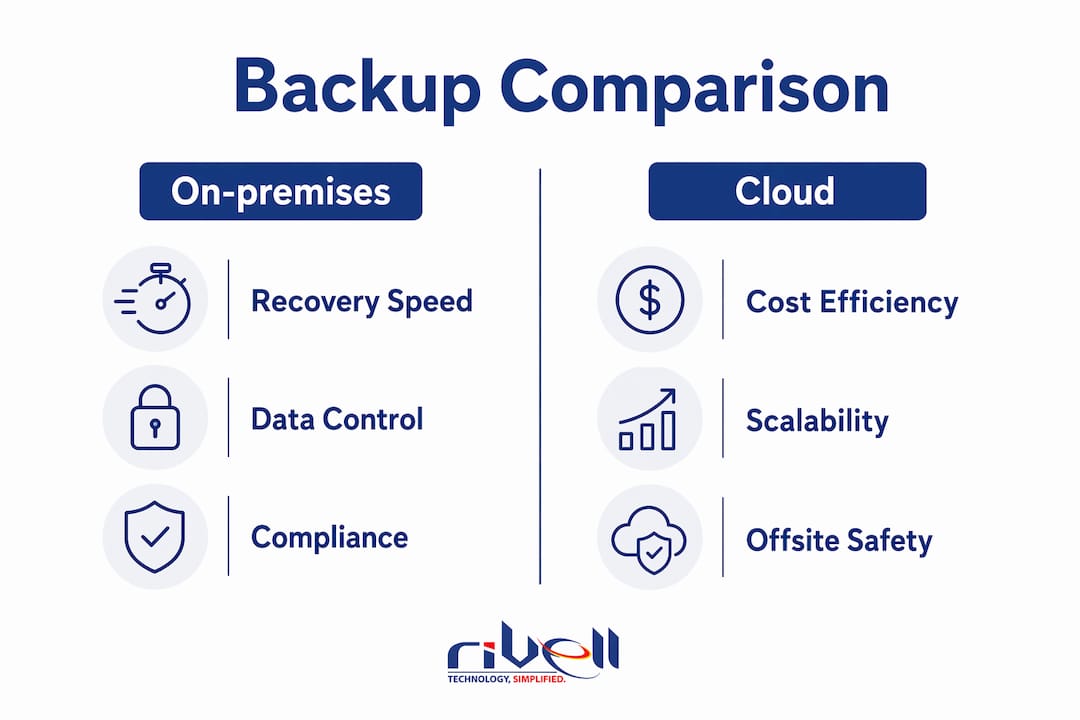
On-premises backup stores copies of your organization’s data on hardware you own and control, whether that’s a NAS device, a dedicated backup server, a tape library, or a disk-to-disk system sitting in your own data center. Cloud backup, by contrast, ships your data over the internet to a third-party provider’s infrastructure. Neither model wins outright. The right choice depends on your recovery time objectives, compliance obligations, data volumes, and budget over a three-year horizon.
The comparison below captures the core tradeoffs at a glance.
| Dimension | On-premises backup | Cloud backup |
|---|---|---|
| Recovery speed | LAN-speed restores, sub-1-hour for 1 TB | Constrained by internet bandwidth |
| Upfront cost | — | — |
| Ongoing cost | Low after purchase; power, cooling, staff | Recurring monthly fees |
| Scalability | Requires hardware purchase to expand | Essentially unlimited with a few clicks |
| Data sovereignty | Full physical control | Governed by provider’s policies |
| Disaster resilience | Vulnerable if co-located with primary data | Offsite by default |
| Compliance fit | Strong for regulated industries | Depends on provider certifications |
The 3-2-1 backup rule frames this well: keep three copies of data, on two different media types, with one copy offsite. On-premises backup covers the local copies with speed and control. It fails the offsite requirement on its own, which is why regulated industries and large enterprises increasingly pair it with a cloud or hybrid layer.
What on-premises backup actually involves
Local backup is not just plugging in a hard drive. A production-grade on-premises backup system has several distinct layers, and understanding each one helps you evaluate whether your current setup is adequate.
Backup types define how much data gets copied and how often:
- Full backup: A complete copy of all selected data. Slowest to run, fastest to restore from.
- Incremental backup: Copies only data changed since the last backup of any type. Fast to run, but restoration requires chaining multiple sets together.
- Differential backup: Copies all data changed since the last full backup. A middle ground between the two.
Hardware is where most of the capital cost lives. Common options include NAS appliances, SAN arrays, dedicated backup servers, and tape libraries for long-term retention. Medium-sized organizations typically run rack-mounted backup servers or SAN/NAS appliances managed by software like Veeam. Enterprise environments add tape for archival tiers and air-gapped copies.
Software handles scheduling, deduplication, versioning, and policy enforcement. Backup software can be bundled with hardware appliances or run separately. Deduplication is worth paying attention to: it reduces the raw storage footprint by eliminating redundant data blocks, which directly affects how long your existing hardware lasts before you need to expand.

Retention policies determine how long backup copies are kept and how many versions are stored. A policy that keeps 30 daily, 12 monthly, and 7 yearly snapshots is common in regulated environments. Getting this wrong in either direction creates problems: too short and you lose recovery points; too long and you exhaust storage capacity faster than planned.
Pros of on-premises backup:
- Full data sovereignty; data never leaves your facility
- LAN-speed restores that outperform cloud restores for large files and full system images
- No recurring storage fees after initial hardware investment
- Works without internet connectivity
- Easier integration with legacy systems and custom retention schedules
- Predictable long-term costs for large data volumes
Cons of on-premises backup:
- High upfront capital expenditure on hardware
- Ongoing costs for power, cooling, rack space, and staff time
- Physical disaster exposure if backup hardware shares the same location as production systems
- Ransomware can encrypt local backups alongside production data without immutability controls
- Scaling requires purchasing and installing additional hardware
- Requires skilled internal staff or a managed service provider for maintenance
How cloud backup works and where it fits
Cloud backup copies your data over the internet to storage managed by a third-party provider. The provider charges based on capacity, bandwidth, number of users, or data egress, depending on the contract structure. You get offsite protection without buying hardware, and you can scale storage with a few configuration changes rather than a procurement cycle.
Cloud backup advantages are real and well-documented:
- Scalability: Storage is essentially unlimited. Adding capacity does not require a hardware purchase.
- Offsite resilience: Data lives in a geographically separate location by default, which satisfies the offsite requirement of the 3-2-1 rule.
- Reduced hardware burden: No servers to rack, no drives to replace, no cooling to manage.
- Remote accessibility: Recovery can be initiated from any location with internet access.
- SaaS data protection: Cloud-to-cloud backup covers data in Microsoft 365, Salesforce, and similar platforms that live entirely outside your data center.
The drawbacks are equally real:
- Bandwidth dependency: Restoring a multi-terabyte dataset over a typical business internet connection takes hours or days, not minutes.
- Recurring costs: Monthly fees accumulate. For organizations with large and growing data volumes, cloud storage costs can eventually exceed the cost of owning hardware outright.
- Less direct control: Data governance depends on the provider’s policies, certifications, and uptime record.
- Egress fees: Retrieving large volumes of data from cloud storage often triggers fees that are easy to underestimate during planning.
Hybrid approaches address the core weakness of each model. Data backs up locally first for fast recovery, then replicates automatically to the cloud for offsite resilience. A hybrid strategy meets the 3-2-1 rule automatically: a local copy on one media type, a cloud copy offsite. Most enterprises with serious recovery time objectives now run some version of this model.
On-premises vs. cloud backup: a direct comparison

The decision between local and cloud backup comes down to four variables: cost over time, recovery speed, compliance requirements, and risk profile.
| Factor | On-premises | Cloud |
|---|---|---|
| 3-year total cost | $5,800–$11,600 | $5,400–$10,800 |
| Recovery speed | Sub-1-hour for 1 TB via LAN | Hours to days depending on bandwidth |
| Compliance fit | Strong for HIPAA, PCI DSS, data residency | Depends on provider certifications |
| Disaster resilience | Weak without offsite replication | Strong by default |
| Scalability | Hardware-constrained | Unlimited |
| Ransomware defense | Requires immutability or air-gapping | Immutable cloud copies available |
| Internet dependency | None | Required for backup and restore |
Cost reality check: The three-year totals are closer than most IT leaders expect. On-premises backup costs $5,800–$11,600 over three years, cloud-only $5,400–$10,800, and hybrid $9,200–$19,400 based on typical small to mid-market business scenarios. The gap widens significantly as data volumes grow, because cloud egress and storage fees scale with data while on-premises hardware costs are largely fixed after purchase.
Recovery speed is where local backup wins decisively. Recovering 1 TB over a LAN takes under an hour in a well-configured environment. The same restore over a 100 Mbps internet connection takes roughly 22 hours. For organizations with aggressive recovery time objectives, that difference determines whether a business stays operational after an incident.
Ransomware exposure is the most underappreciated risk in on-premises environments. In 94% of ransomware attacks, attackers attempt to compromise backup repositories. Without immutable or air-gapped storage, a local backup is not a safe recovery point. It is just another target.
Compliance does not automatically favor one storage location. Organizations should map data residency, retention, encryption, access, audit evidence, recovery, vendor, and contract requirements to the specific design. Physical control can be relevant, but it does not by itself establish compliance, security, recoverability, or suitability.
How to decide which backup model fits your organization
Start with your recovery time objective and recovery point objective, not your budget. Those two numbers define the minimum performance your backup system must deliver. Everything else is a constraint you work within.
Key decision factors:
- Compliance requirements: Does your industry mandate data residency, physical control, or an isolated backup copy? If yes, on-premises or a private cloud component is likely non-negotiable.
- Recovery time objective: If you need to restore a full server in under two hours, cloud-only backup probably cannot meet that target without a local cache.
- Data volume: Organizations managing multi-petabyte datasets often find that cloud egress fees make cloud-only backup economically unfavorable over a three-year horizon.
- IT staffing: On-premises backup requires skilled staff for maintenance, media management, and integrity verification. If your IT team is lean, a managed service model or cloud-first approach reduces that burden.
- Internet reliability: Locations with unreliable or limited connectivity need local backup as a fallback, regardless of what else is in the architecture.
- Capital vs. operating expenditure: On-premises backup is a capital expenditure model with predictable long-term costs. Cloud backup converts that to an operating expenditure with lower upfront cost but ongoing fees.
Pro Tip: Before finalizing your backup model, run a tabletop exercise simulating a ransomware attack. Identify which recovery points would be accessible, which would be compromised, and how long restoration would actually take. The gaps that surface almost always change the architecture decision.
A hybrid backup model fits most organizations that need both fast local recovery and offsite resilience. It is not the right answer for every budget, but for businesses where downtime has a measurable hourly cost, the additional investment in hybrid infrastructure typically pays for itself in the first major incident.
Expert best practices for on-premises backup
Backup architecture has shifted from a tool selection exercise to a business continuity decision. The question is no longer which software to buy. It is which architectural pattern best balances control, compliance, cost, and recovery capability for your specific risk profile.
The 3-2-1 backup rule remains the baseline standard. Three copies, two media types, one offsite. On-premises backup alone satisfies only part of this. Pairing local storage with cloud replication or a secondary physical site completes the requirement. No single backup model automatically satisfies all three conditions.
Hidden costs catch organizations off guard. Beyond the initial hardware purchase, on-premises backup requires ongoing capital for hardware refresh cycles, power and cooling, and staff time for tasks like media swaps, integrity verification, and capacity planning. These costs are real and recurring, even if they do not show up as a monthly line item the way cloud fees do.
Ransomware defense requires more than just having a backup. In 94% of ransomware attacks, attackers target backup repositories directly. Air-gapped backups, where the storage device has no network connection to production systems, and immutable backups, where data cannot be modified or deleted for a defined retention period, are the two most effective defenses. Regulated sectors like healthcare and finance often require an internet-isolated “gold copy” of backup data specifically to meet both compliance and ransomware protection standards.
Testing is the step most organizations skip. A backup that has never been tested is not a backup. It is an assumption. Schedule quarterly restore tests covering at minimum a full server restore, a file-level recovery, and a bare-metal restore to dissimilar hardware. Document the results. Auditors in regulated industries will ask for them.
Key components of an on-premises backup system
A production-ready on-premises backup system has five core layers, and a gap in any one of them creates a recovery risk.
1. Backup targets are the physical storage devices that receive backup data. NAS appliances work well for small to mid-sized environments because they are network-accessible, relatively easy to manage, and cost-effective for moderate data volumes. SAN arrays serve larger environments where performance and redundancy requirements exceed what NAS can deliver. Tape libraries remain relevant for long-term archival and air-gapped copies, particularly in enterprise and regulated environments.
2. Backup software orchestrates the entire process: scheduling jobs, managing retention policies, handling deduplication and compression, and generating reports. The software layer also controls whether backups are immutable, which is the single most important configuration decision for ransomware defense. Tools like Veeam are common in mid-market environments for their broad workload coverage and snapshot-based recovery capabilities. HYCU offers strong protection for cloud-native and hybrid workloads, particularly in environments running Nutanix or Google Cloud. Pulseway combines backup management with remote monitoring, which suits IT teams that need to manage backup health alongside the rest of their infrastructure from a single console.
3. Storage media includes the physical disks, tape cartridges, or solid-state drives that hold backup data. Media selection affects cost per terabyte, restore speed, and longevity. Disk-to-disk backup is fastest for recovery. Tape is cheapest per terabyte for long-term retention and provides natural air-gapping when cartridges are stored offsite.
4. Retention policies define how long each backup generation is kept. A common enterprise policy follows the Grandfather-Father-Son (GFS) model: daily backups retained for 30 days, weekly backups for 12 weeks, monthly backups for 12 months, and annual backups for seven years. Retention policies must align with both your recovery point objectives and any regulatory requirements governing how long records must be kept.
5. Network infrastructure determines how fast data moves from production systems to backup targets. Backup traffic on a shared production network can degrade application performance during backup windows. Dedicated backup VLANs or separate physical networks for backup traffic are standard practice in environments where backup jobs run during business hours or where data volumes are large enough to saturate shared links.
Challenges that on-premises backup creates over time
The appeal of local backup is control and speed. The friction is everything that comes after the initial deployment.
Scalability is the most persistent problem. Storage fills up faster than most organizations plan for, and adding capacity means a procurement cycle, physical installation, and reconfiguration of backup policies. Cloud storage adds capacity in minutes. On-premises storage adds it in weeks, sometimes months if budget approval is required.
Maintenance load accumulates. Hardware requires monitoring, firmware updates, drive replacements, and periodic integrity checks. Backup jobs fail silently if no one is watching. Media degrades. NAS drives fail. Without a dedicated person or a managed IT service actively monitoring backup health, organizations often discover a problem only when they attempt a restore under pressure.
Physical disaster exposure is a structural weakness. A fire, flood, or theft event that destroys primary systems will also destroy co-located backup hardware. This is not a theoretical risk. It is the reason the 3-2-1 rule exists. On-premises backup without an offsite copy is a single-point-of-failure architecture, regardless of how well the local hardware is configured.
Staff dependency creates operational risk. Unlike cloud backup, which can be managed remotely and often requires minimal hands-on intervention, local backup requires someone physically present at the backup site for certain maintenance tasks. When that person leaves the organization, institutional knowledge about the backup configuration often leaves with them.
Compliance requirements change over time. Retention, data-location, encryption, access, logging, and audit-evidence obligations should be reviewed against the current workload and applicable requirements. Provider attestations and service eligibility do not transfer automatically to a customer’s configuration. Rivell’s cloud provider comparison framework lists responsibility, region, governance, and contract checks to complete before selecting a backup platform.
Understanding IT infrastructure management as an ongoing discipline, not a one-time deployment, is what separates organizations that recover cleanly from those that discover their backup was broken at the worst possible moment.
Key Takeaways
On-premises backup delivers the fastest local recovery and the strongest data sovereignty, but it requires pairing with an offsite layer to meet the 3-2-1 rule and defend against physical disasters.
| Point | Details |
|---|---|
| Recovery speed advantage | Local restores operate at LAN speeds; recovering 1 TB in under an hour is routine. |
| Three-year cost parity | On-premises backup costs $5,800–$11,600 over three years, cloud-only $5,400–$10,800, and hybrid $9,200–$19,400; ranges will differ based on scenario. |
| Ransomware risk | In 94% of ransomware attacks, attackers target backup repositories; immutable or air-gapped storage is required. |
| 3-2-1 rule compliance | On-premises backup alone fails the offsite requirement; a hybrid model is the most reliable way to satisfy all three conditions. |
| Hidden ownership costs | Hardware refresh, power, cooling, and staff time add recurring costs beyond the initial purchase. |
Rivell helps businesses across New Jersey design and manage backup architectures that meet real recovery objectives, not just checkbox compliance. Whether you are evaluating managed IT services for your business or need a second opinion on your current backup posture, Rivell’s team brings over 25 years of hands-on infrastructure experience to the conversation.