
Remote Monitoring and Management (RMM) is software that lets IT teams watch over, maintain, and fix computers, servers, and networks from anywhere, without a truck roll. It runs on small agents installed on each device, and it’s the engine behind most modern managed IT services. If you’ve ever wondered how an IT provider seems to know about a failing hard drive before you do, RMM is usually the answer.
RMM matters because it flips IT from reactive to proactive. Instead of waiting for a call about a frozen laptop, technicians see the warning signs first.
- Who uses it: Managed service providers (MSPs) and internal IT teams supporting hybrid or remote workforces
- What it delivers: Continuous visibility into endpoint health, automated patching and scripting, and the ability to remediate issues remotely, often before a user notices anything wrong
Key Takeaways
RMM works because it replaces reactive break-fix support with continuous, automated oversight of every managed endpoint.
| Point | Details |
|---|---|
| Core definition | RMM uses installed agents to monitor endpoints and report to a centralized console, per Wikipedia’s overview. |
| Automation drives ROI | Scripts, scheduled tasks, and patch policies let one technician manage far more endpoints than manual support allows. |
| Security needs scrutiny | Encrypted traffic, credential vaulting, and audit trails are non-negotiable given the privileged access RMM agents carry. |
| Pilot before full rollout | Test on 5 to 10% of your fleet and establish a baseline before tightening alert thresholds fleet-wide. |
| Rivell’s approach | Rivell integrates RMM with patching, backups, and virtual CISO services as one managed IT contract for New Jersey businesses. |
Table of Contents
- How Does RMM Work? Agents, Consoles, and Automation Explained
- What Features Should You Expect From Modern RMM Software?
- What Business Benefits Does RMM Actually Deliver?
- How Secure Is RMM, and What Controls Matter Most?
- How Do You Choose the Right RMM Platform?
- What Does a Practical RMM Deployment Checklist Look Like?
- How Rivell Puts RMM to Work for Clients
- Where RMM Fits in the Bigger IT Picture
- Get RMM Benefits Without Building the Stack Yourself
- Frequently Asked Questions
- Sources
How Does RMM Work? Agents, Consoles, and Automation Explained
Every RMM platform runs on a simple loop: install an agent, collect data, act on it. The details of that loop, though, separate a mediocre setup from one that actually prevents downtime.
Most vendors offer two deployment styles. A persistent agent installs directly on a workstation, server, or virtual machine and runs continuously in the background, reporting in on a set schedule. An ephemeral connector, by contrast, spins up temporarily for a single session, often used for one-off remote support on a device the provider doesn’t manage long-term. MSPs typically standardize on persistent agents for client-owned infrastructure since they generate the ongoing telemetry that makes proactive monitoring possible. Supported endpoints usually include Windows and Mac workstations, physical and virtual servers, and increasingly, network devices like firewalls and switches through SNMP polling.
The agent’s job is to collect telemetry: CPU load, memory usage, disk space and drive health, running processes, Windows event logs, patch status, and basic network statistics like latency and packet loss. That data streams back to a centralized management console, where it’s compared against thresholds. Cross a threshold, and the console fires an alert, whether that’s an email, a ticket in a professional services automation (PSA) tool, or a page to an on-call technician. Wikipedia’s overview of remote monitoring and management describes this agent-to-console architecture as the defining structure of the category, and it’s held up as the standard model for over a decade.
The real value shows up in automation. Modern platforms let technicians build:
- Scripts that run automatically when a condition is met, such as clearing temp files when disk space drops below 10%
- Scheduled tasks for routine maintenance like reboots, disk cleanups, or antivirus definition updates during off-hours
- Policy enforcement that applies consistent configurations, like screen-lock timeouts or firewall rules, across every managed device in a group
- Patch deployment rules that stage updates to a test group before pushing company-wide
Pro Tip: Don’t turn on every default alert threshold when you first deploy an RMM agent. Most platforms ship with overly sensitive defaults that flood technicians with noise. Spend the first two weeks tuning thresholds against real baseline behavior before treating any alert as urgent.
TeamViewer’s guidance on RMM software for IT professionals notes that this combination of centralized visibility and automation is what cuts down the need for physical site visits, which is precisely why the category grew alongside distributed and hybrid workforces.
What Features Should You Expect From Modern RMM Software?
Not all RMM platforms are built the same, but a mature product covers five functional areas. Skimping on any one of them usually shows up later as a support headache.
- Continuous monitoring and alerting with threshold tuning. The system should let you set different sensitivity levels per device type or client, not a single blanket rule.
- Patch management and automated updates. This covers operating system patches, third-party application updates, and the ability to stage rollouts instead of pushing everything at once.
- Remote control and remote support tools. Technicians need to jump into a session, view the screen, transfer files, and run commands without disrupting the end user.
- Asset and software inventory with licensing tracking. Knowing exactly what’s installed where matters for compliance audits and for catching unlicensed or end-of-life software before it becomes a liability.
- Reporting, dashboards, and SLA metrics. Clients and internal stakeholders want proof of uptime, response times, and ticket resolution, not just a promise that things are handled.
ConnectWise frames RMM as one piece of a broader platform that also touches cybersecurity and endpoint management, and that framing matters. Buyers increasingly expect RMM to integrate with backup tools, antivirus, and security information tools rather than function as an isolated monitoring dashboard.
Gartner’s research supports why this integration push is accelerating: worldwide IT spending is projected to grow 9.8% in 2025, with automation and infrastructure software cited as major growth drivers. That spending trend is a signal that businesses are actively budgeting for exactly the kind of tooling RMM provides, not treating it as optional overhead.
What Business Benefits Does RMM Actually Deliver?
The technical features matter only because of what they produce operationally: fewer outages, faster fixes, and support that scales without proportionally scaling headcount.

RMM shortens mean time to resolution (MTTR) because technicians catch problems, like a failing disk or a stalled backup job, before they cascade into an outage. A server that would have failed silently over a weekend instead triggers an alert Friday afternoon, giving IT a window to intervene before anyone’s locked out of their files Monday morning.
A few scenarios where this plays out consistently:
- Onboarding remote employees. New hires working from home get monitored and patched the same as someone sitting in a headquarters office, with no difference in security posture.
- Managing branch offices. A regional business with three or four locations can run consistent patch policies and monitoring across all of them from one console instead of visiting each site.
- Delivering proactive SLAs. MSPs use RMM data to prove they caught and fixed issues before a client even opened a ticket, which is a stronger sales argument than “we responded fast.”
For MSP delivery models specifically, RMM changes the economics of support. One technician can reasonably oversee hundreds of endpoints instead of a handful, because automation handles routine maintenance and alerts surface only what genuinely needs a human. That’s the difference between a support model that requires headcount to grow linearly with client count and one that scales far more efficiently. Growth in remote and hybrid work has only widened the pool of endpoints businesses need to manage this way, a shift Pew Research has tracked since 2020 and one the World Economic Forum notes has held steady well beyond the pandemic’s acute phase.
How Secure Is RMM, and What Controls Matter Most?
RMM tools carry significant privilege by design. An agent that can push patches and run scripts across an entire fleet is also a single point of failure if compromised, which is exactly why security controls around it deserve real scrutiny.
- Session control and privileged access management. Remote support sessions should require explicit authentication, ideally multi-factor, and should log every action a technician takes during the session.
- Encrypted agent traffic and credential storage. Telemetry moving between endpoint and console needs encryption in transit, and stored credentials (like local admin passwords) need to sit in a vault, not plain text configuration files.
- Audit trails and change logging. Every script execution, patch deployment, and configuration change should generate a log entry that feeds into incident response workflows or a SIEM if one is in place.
- Vendor risk and supply-chain assurance. Since RMM agents run with elevated privileges across every managed device, a vulnerability in the RMM vendor’s own software becomes everyone’s problem simultaneously.
That last point isn’t theoretical. CISA’s Joint Cyber Defense Collaborative specifically includes RMM in its coordinated cyber-defense planning, a recognition that RMM tools have become high-value targets precisely because of the broad access they carry across client environments.
Pro Tip: Ask any RMM vendor how they handle credential vaulting and whether remote sessions are recorded by default. If the answer involves “we’re working on it,” treat that as a disqualifying red flag, not a minor gap.
How Do You Choose the Right RMM Platform?
Vendor selection usually goes wrong when teams shop on feature checklists instead of operational fit. Here’s a sharper way to evaluate:
- Scalability. Can the platform handle your endpoint count today and at double that size without a painful re-platform?
- Automation depth. Does it support custom scripting and conditional logic, or just canned maintenance tasks?
- Security posture. Does it offer encrypted credential storage, session recording, and role-based access controls out of the box?
- Integration with PSA and ticketing. Can it sync tickets, time entries, and asset data with the tools you already run, or does it require manual reconciliation?
- Support and pricing model. Is pricing per-endpoint, per-technician, or tiered by feature set, and does that align with how your business actually grows?
When you get vendors on a call, ask direct questions: How long does onboarding typically take for a fleet our size? What’s the agent’s memory and CPU footprint on an average workstation? Does the platform have native integration with our PSA, or does it require a third-party connector? And critically, what’s the restore or backout process if a scripted change breaks something?
Watch for a few operational red flags during evaluation. Opaque access controls, where you can’t clearly see who touched what and when, are a serious problem. Weak or nonexistent logging makes post-incident investigation nearly impossible. And limited automation, where every routine task still requires manual technician intervention, defeats much of RMM’s purpose in the first place. Reviewing product comparisons on sites like G2’s RMM category page can help narrow a shortlist, but treat those reviews as a starting point for a pilot, not a substitute for testing the platform against your own environment.
What Does a Practical RMM Deployment Checklist Look Like?
Rolling out RMM across an entire environment on day one is how outages happen. A staged approach protects against exactly that.
- Select a pilot group. Choose a small, low-risk set of devices, maybe 5 to 10% of your fleet, that represents your typical hardware and software mix. Define success criteria upfront: alert accuracy, agent stability, no unexpected performance impact.
- Roll out agents in stages. Expand from pilot to a broader group only after the pilot runs clean for at least a full patch cycle. Keep a documented rollback plan in case an agent update causes conflicts with existing software.
- Establish baseline monitoring. Let the platform run for two to three weeks before tightening alert thresholds. This baseline period reveals what “normal” actually looks like for your environment, which is essential before you can spot what’s abnormal.
- Build runbooks and set a maintenance cadence. Document standard responses to common alerts so any technician on the team can act consistently, and schedule a recurring review, monthly is typical, to refine thresholds and retire alerts that aren’t adding value.
How Rivell Puts RMM to Work for Clients
Rivell pairs RMM with the rest of a managed services stack rather than treating it as a standalone tool. Monitoring feeds directly into patching schedules, backup verification, and the ongoing security oversight our virtual CISO function provides, so a single alert can trigger the right response across systems instead of getting handled in isolation.
The measure of an RMM deployment isn’t how many alerts it generates. It’s whether a client’s environment stays stable enough that they rarely think about their IT at all. That’s the outcome we track client by client, from uptime to how fast a ticket gets a human response.
Every new client gets an onboarding process built around baseline monitoring first, then a documented runbook specific to their environment, so support stays consistent no matter which technician picks up the ticket.
Where RMM Fits in the Bigger IT Picture
The trade-off with RMM isn’t whether to adopt it. It’s how much operational discipline you bring to running it. A platform with strong automation and weak alert tuning creates more noise than value, while a modestly featured platform paired with tight processes often outperforms it. Teams evaluating RMM should run a real pilot before committing to a fleet-wide rollout, and treat the vendor checklist above as a starting point, not a formality. For businesses that don’t want to own that operational overhead internally, pairing RMM with a managed IT services partner is usually the faster path to the outcomes RMM promises.
Get RMM Benefits Without Building the Stack Yourself
Running RMM well takes more than buying a license. It takes tuned thresholds, tested runbooks, and someone watching the console at 2 a.m. when a server starts throwing errors. Rivell handles all of that as part of a managed IT services agreement, so New Jersey businesses get continuous monitoring, automated patching, help desk support, and backup oversight without hiring an internal team to run it.
Rivell is the practical alternative to standing up your own IT department: one contract covers monitoring, patching, cybersecurity protection, and a virtual CISO for compliance-heavy industries like healthcare and law. If your team is weighing whether to license RMM software internally or hand the whole operation to a partner who already runs it at scale, that second option usually costs less than an in-house hire and gets you faster response times from day one. Businesses that need help desk support, network management, and proactive monitoring working together, not as separate line items, tend to be the best fit for handing this off entirely.
Ready to see what proactive IT management looks like for your business? Visit Rivell’s managed IT services for small business page to get started.
Frequently Asked Questions
What is RMM in simple terms?
RMM stands for Remote Monitoring and Management. It’s software that lets IT teams watch and maintain computers, servers, and networks remotely using small installed agents, catching problems before they cause downtime.
What’s the difference between RMM and PSA?
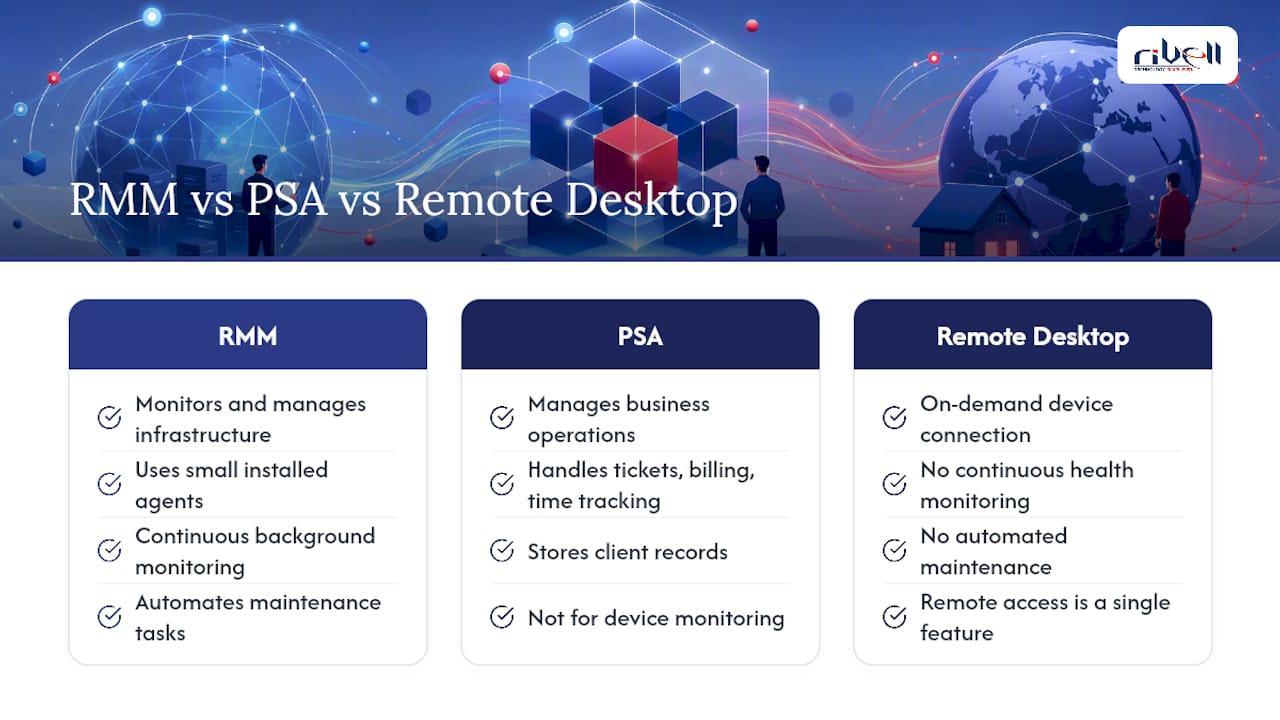
RMM monitors and manages the actual IT infrastructure, endpoints, servers, networks. A PSA (professional services automation) tool manages the business side: tickets, billing, time tracking, and client records. Most MSPs run both, integrated so an RMM alert automatically creates a PSA ticket.
How does RMM differ from basic remote management or remote desktop tools?
Basic remote desktop software just lets someone connect to a device on demand. RMM continuously monitors device health in the background and automates maintenance tasks, remote access is just one feature within a much broader platform.
What are some examples of RMM solutions on the market?
The category includes platforms built for MSPs and enterprise IT teams, each varying in automation depth, supported endpoints, and PSA integration. Reviewing feature comparisons on directories like G2 alongside a hands-on pilot is the most reliable way to evaluate fit for your environment.
Is RMM only useful for managed service providers?
No. Internal IT teams at any business with more than a handful of devices, especially those supporting remote or hybrid staff, benefit from the same continuous monitoring and automation that MSPs rely on.
Sources
For readers who want to verify claims or dig deeper, CISA’s JCDC remote monitoring and management cyber defense plan covers RMM’s role in national cyber defense coordination. Gartner’s 2025 IT spending forecast provides market context for automation investment. For product research, G2’s RMM category and vendor guides from TeamViewer and ConnectWise offer additional detail on features and deployment.
- JCDC remote monitoring and management cyber defense plan
- Gartner forecasts worldwide IT spending to grow 9.8% in 2025
