
An IT disaster recovery program is a managed, testable set of policies, roles, runbooks, and technical controls that ensure IT systems and data are recovered to agreed RTO and RPO targets after a disruptive event. The NIST SP 800-34 Contingency Planning Guide for Federal Information Systems is the U.S. technical baseline for building this program, and it applies well beyond federal agencies.
Three things you should do today, before anything else:
- Identify your Tier 0 systems. These are the systems whose failure immediately halts revenue or patient safety. If you cannot name them in 30 seconds, your program has no foundation.
- Confirm your last successful backup integrity. Not just that a backup ran. Confirm a restore was tested and the data is clean.
- Ensure offline copies of your recovery plan exist. A plan stored only on systems that go down in a disaster is no plan at all.
Every complete program also needs these elements: a written policy with version history, documented RTO/RPO targets, a current system inventory, named recovery owners and backups for each role, tested runbooks for critical systems, a communication and escalation protocol, and a scheduled testing cadence.
Table of Contents
- What does an IT disaster recovery program actually cover?
- Core components every IT disaster recovery program must include
- How do you set RTO and RPO targets that hold up?
- How do you build an IT disaster recovery program step by step?
- What backup strategy actually meets your RPO targets?
- How often should you test your disaster recovery plan?
- How does a managed IT provider operationalize your ITDR program?
- Which authoritative resources should you reference during planning?
- Key Takeaways
- What most DR programs get wrong (and how to avoid it)
- Rivell handles the DR work so your team can focus on the business
- Useful sources and further reading
What does an IT disaster recovery program actually cover?
IT disaster recovery (ITDR) is one layer in a broader resilience stack, and confusing it with adjacent disciplines causes real problems when an event hits.
| Discipline | Focus | Activation trigger | Primary owner |
|---|---|---|---|
| IT Disaster Recovery (ITDR) | Restore IT systems and data to RTO/RPO targets | System or data loss event | IT Director / CIO |
| Business Continuity Plan (BCP) | Keep mission-critical business functions operating | Any major disruption | COO / Business unit leads |
| Incident Response (IR) | Contain and eradicate a security threat | Detected security incident | CISO / Security team |
Per NIST SP 800-34, a Disaster Recovery Plan (DRP) addresses major physical disruptions that deny access to the primary facility and require relocation. An Information System Contingency Plan (ISCP) covers system recovery regardless of site. These are related but distinct documents, and your program should reference both. The Microsoft Azure Well-Architected disaster recovery guide reinforces that incident management is a prerequisite for effective DR — you cannot recover what you have not first contained.
System tiers: what belongs where
Tier assignments make scope concrete. Here is a practical breakdown:
- Tier 0 (mission-critical): Core EHR systems, payment processing, Active Directory, primary email, VoIP infrastructure. Failure causes immediate revenue loss or safety risk. RTO: under 4 hours.
- Tier 1 (business-critical): CRM, ERP, file servers, secondary authentication. Failure disrupts operations significantly within hours. RTO: 4–24 hours.
- Tier 2 (important): Reporting tools, non-critical databases, development environments. Failure is disruptive but tolerable for 1–3 days. RTO: 24–72 hours.
- Tier 3 (deferrable): Archive systems, legacy applications with infrequent use. Recovery can wait beyond 72 hours.
Responsibility is straightforward: the CIO owns recovery objectives; IT operations owns backup execution; the security team owns incident containment; and a designated executive (typically the CIO or COO) holds disaster declaration authority.
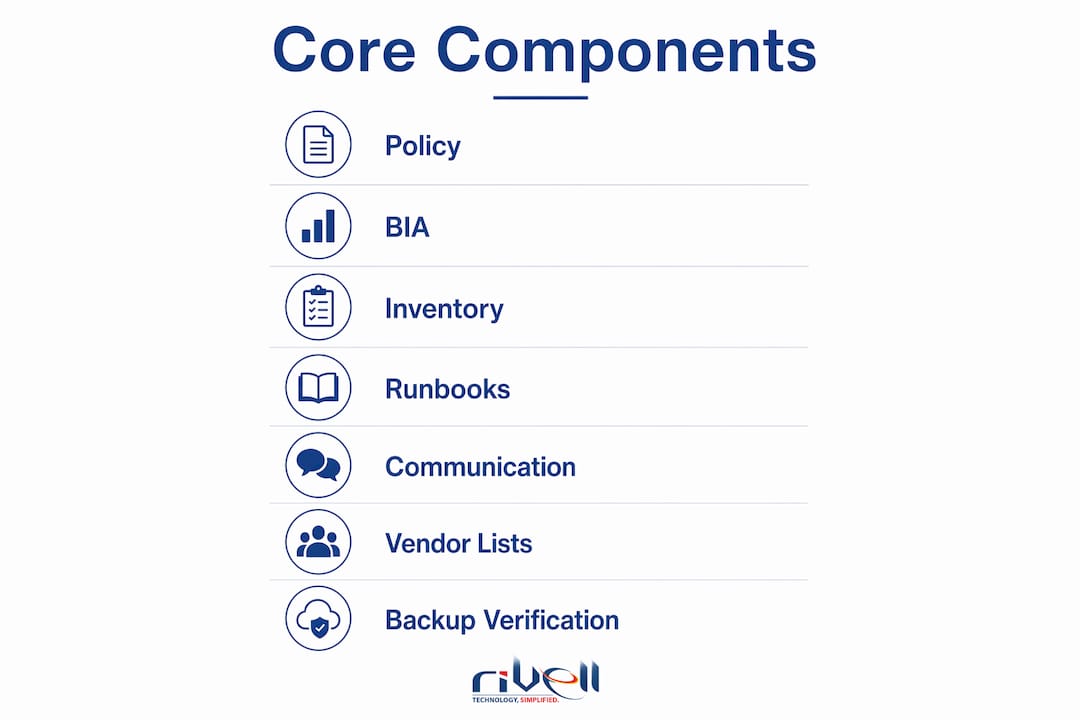
Core components every IT disaster recovery program must include
A program is not a single document. It is a collection of living artifacts, each with an owner and a review date.

Policy and governance anchors everything. The policy defines scope, sets the review cadence (annually at minimum, and after any significant infrastructure change), assigns program ownership, and establishes versioning. Without a signed policy, recovery efforts during an event become improvised.
Business Impact Analysis (BIA) outputs are the program’s engine. The BIA identifies which systems support which business processes, quantifies the financial and operational impact of downtime, and produces the criticality tiers that drive every downstream decision. Ready.gov is explicit: IT recovery priorities must align with BIA-derived business function priorities, not the other way around. Understanding your cost of IT downtime is the first honest step in that analysis.
System inventory and dependency mapping translates the BIA into a technical picture. Map each application to its underlying infrastructure: servers, databases, network paths, third-party APIs, and cloud services. A gap in this map becomes a gap in your recovery sequence.
Runbooks and playbooks are the step-by-step recovery procedures for each critical system, with a named primary owner and a named backup. A runbook that only one person knows is a single point of failure. Good runbooks read clearly at 3 AM under stress — short steps, explicit commands, no assumed knowledge. See the guidance on building runbooks engineers trust for a practical template.
Communication and escalation protocols define who notifies whom, in what order, through what channels, and what the message contains. This includes internal stakeholders (executives, department heads), external parties (vendors, regulators, customers), and backup communication channels when primary systems are down.
Vendor and contract lists, alternate site arrangements, and backup verification procedures round out the program. Know your cloud provider SLAs, your colocation contract terms, and your hardware replacement lead times before you need them.
Pro Tip: Keep a laminated one-page “break glass” card at each IT manager’s desk and in a secure off-site location. It should list the top five Tier 0 systems, the disaster declaration contact, and the offline plan storage location. When systems are down and stress is high, that card earns its keep.
How do you set RTO and RPO targets that hold up?
RTO is the maximum acceptable time from disruption to restored service. RPO is the maximum acceptable data loss measured backward from the recovery point. RTO looks forward; RPO looks backward. Both are business decisions, not technical ones.
RTO/RPO targets by application tier
| Tier | Example systems | Target RTO | Target RPO | Recovery approach |
|---|---|---|---|---|
| Tier 0 | EHR, payment processing, AD | Very short RTO | Minimal data loss acceptable | Hot site / active-active |
| Tier 1 | CRM, ERP, file servers | Moderate RTO | Acceptable data loss window based on business requirements | Warm standby / DRaaS |
| Tier 2 | Reporting tools, dev environments | Longer RTO period aligned with business tolerance | Recovery approaches adapted accordingly | |
| Tier 3 | Archives, legacy apps | Extended RTO | Data recovery strategies designed for non-urgent restoration |
Setting these targets requires three inputs: the Maximum Tolerable Downtime (MTD) from the BIA, the cost of downtime per hour for each system, and the cost of the recovery architecture required to meet the target. As AWS notes, overly aggressive targets drive up cost and complexity, while lax targets expose unacceptable business risk. Application owners must be in the room when targets are set — IT cannot make this call alone.
Architecture follows targets directly. A Tier 0 RTO under four hours demands a hot site or active-active cloud configuration with automated failover. A Tier 2 RTO of 48 hours can be met with periodic cloud backups and a manual restore process. Cloud recovery designs, such as active-passive and warm standby, require infrastructure-as-code and automated provisioning to meet tight RTOs cost-effectively at scale.
A few practical notes on the calculation:
- Multiply hourly revenue impact by the RTO to estimate the maximum recovery investment ceiling, adjusting for organizational priorities.
- Factor in regulatory penalties for regulated industries (HIPAA, SOX) — these often exceed direct revenue loss.
- Revisit targets annually and after any major application change.
How do you build an IT disaster recovery program step by step?
The NIST SP 800-34 seven-step contingency planning process is the most widely used development framework in the U.S. Here is how each step maps to practical deliverables, owners, and a 180-day rollout timeline.
Develop the contingency planning policy statement (Days 1–15). Output: a signed policy document with scope, objectives, roles, review cadence, and version control. Owner: CIO. This gives the program legal authority and organizational standing.
Conduct the Business Impact Analysis (Days 16–45). Output: BIA report with system criticality tiers, MTD per system, cost-of-downtime estimates, and resource dependencies. Owner: IT Director with application owners. This is the most time-intensive step and the one most often skipped — which is why so many programs collapse under pressure.
Identify preventive controls (Days 46–60). Output: preventive controls register listing redundant power, network failover, patch status, and access controls. Owner: IT operations and security team. Reducing the probability of an event is cheaper than recovering from one.
Create contingency strategies (Days 61–90). Output: documented recovery strategies per tier (hot site, warm standby, DRaaS, cloud failback, manual procedures). Owner: IT architect with vendor input. Strategies must map directly to the RTO/RPO targets from Step 2.
Develop the IT contingency plan (Days 91–120). Output: the full plan document including runbooks, communication protocols, vendor contacts, alternate site procedures, and activation criteria. Owner: IT Director. This is the artifact most people call “the DR plan” — but it is only useful if Steps 1–4 are done first.
Ensure plan testing, training, and exercises (Days 121–150). Output: first tabletop exercise report with gap analysis and assigned corrective actions. Owner: IT Director with department leads. Testing validates that the plan works; training ensures people know their roles before an event.
Maintain the plan (Days 151–180 and ongoing). Output: versioned plan updates, annual review schedule, change-triggered review log. Owner: IT Director. A plan that is not maintained is a liability — it creates false confidence.
After the initial 180-day rollout, the maintenance cycle becomes the program. Schedule annual full reviews, update runbooks within 30 days of any significant infrastructure change, and re-run the BIA whenever a new critical application is added.
What backup strategy actually meets your RPO targets?
Backup architecture is where RPO targets either hold or fail. The right approach depends on the tier, the data change rate, and the recovery environment.
| Backup approach | RPO achievable | Best for | Key trade-off |
|---|---|---|---|
| Continuous replication | Minutes or less | Tier 0 databases, EHR | High cost; requires dedicated replication infrastructure |
| Snapshot replication | 1–4 hours | Tier 0/1 VMs and file systems | Snapshot frequency determines RPO; storage costs scale |
| Periodic full + incremental | 4–24 hours | Tier 1/2 systems | Restore time increases with incremental chain length |
| Immutable cloud backup | 24–48 hours | Ransomware resilience across all tiers | Slightly longer RPO; protects against encrypted backup attacks |
Immutable backups deserve special attention. Ransomware groups now target backup systems specifically. An immutable backup stored in a write-once cloud bucket cannot be encrypted or deleted by an attacker who has compromised your network. This is no longer optional for any organization handling sensitive data. Cybersecurity and business continuity are inseparable at this point.
For ransomware recovery specifically: eradicate the threat before you restore. Restoring an infected snapshot to production re-introduces the infection and can extend your actual RTO dramatically. Validate backup integrity on a staging system first, confirm the restore point predates the infection, and only then promote to production.
Backup verification checklist:
- Restore a sample of critical data to staging at least monthly.
- Verify file integrity with checksums, not just successful job completion.
- Confirm restore times against RTO targets to ensure backups support the defined recovery objectives.
- Test application functionality post-restore, not just data presence.
- Document every test result with date, restorer name, and outcome.
BaaS vs. DRaaS: Backup as a Service (BaaS) covers data protection and restoration. Disaster Recovery as a Service (DRaaS) covers full system failover to a cloud environment, including compute and networking. If your Tier 0 RTO is under four hours, BaaS alone will not get you there. DRaaS is the right architecture for tight RTOs, and it shifts much of the failover execution responsibility to the provider. Rivell’s data backup and disaster recovery services cover both models for New Jersey businesses.
How often should you test your disaster recovery plan?
Industry best practices recommend a three-tier testing cadence: quarterly tabletop exercises, semi-annual functional tests, and an annual full-scale failover simulation. Add change-triggered tests whenever a major infrastructure change occurs.

Recommended testing cadence and metrics
| Test type | Frequency | What it validates | Key metrics to capture |
|---|---|---|---|
| Tabletop exercise | Quarterly | Decision-making, communication, role clarity | Time to reach key decisions, gaps identified |
| Functional test | Semi-annual | Backup restoration, runbook accuracy, partial failover | Time-to-restore, data integrity, runbook gaps |
| Full-scale failover | Annual | End-to-end recovery to alternate site or cloud | Actual RTO vs. target, actual RPO vs. target, communication lag |
| Change-triggered test | After major changes | Impact of change on recovery procedures | Runbook accuracy post-change |
A tabletop exercise is a structured discussion, not a technical test. Walk through a realistic scenario (ransomware attack, data center fire, ISP outage) and ask each role holder what they would do. The gaps that surface are almost always in communication and decision authority, not technical procedures.
A functional test goes further: actually restore a backup, actually fail over a non-production system, actually send the stakeholder notification. This is where you discover that the backup job succeeded but the restore takes six hours longer than expected.
A full-scale failover is the only test that validates your actual RTO against your target. Run it annually, document every step, and measure the gap between your target and your actual recovery time.
Gap analysis requirements: Every test produces a gap analysis report. Each gap gets an assigned owner, a corrective action, and a resolution deadline. Gaps that are not assigned to a named owner do not get fixed. The report should include: test date, scenario used, participants, systems tested, metrics captured, gaps identified, and corrective actions with owners and SLAs.
For detailed verification steps, Rivell’s guide on verifying your disaster recovery plan covers the full checklist.
How does a managed IT provider operationalize your ITDR program?
A managed provider does not replace your program ownership. It operationalizes the technical execution so your team can focus on governance and business decisions.
Here is what a managed provider typically owns versus what the customer retains:
Managed provider owns:
- Continuous monitoring and alerting for backup job failures and system anomalies
- Failover execution for contracted systems within agreed SLAs
- Runbook hosting in an accessible, offline-capable platform
- BIA facilitation and annual review support
- Test scheduling, execution support, and gap analysis documentation
- Vendor coordination during recovery events
Customer retains:
- Disaster declaration authority
- Business impact prioritization and RTO/RPO approval
- Regulatory compliance accountability
- Communication to customers, regulators, and executives
When evaluating a managed DR partner, check for these specifics: documented RTO/RPO SLAs per tier, named incident response contacts with escalation paths, test support included in the contract (not billed separately), evidence of compliance with relevant regulations (HIPAA, SOX, PCI-DSS), and proof of their own DR capability.
Rivell’s typical engagement follows a structured onboarding: a facilitated BIA in the first 30 days, system inventory and dependency mapping in days 31–60, runbook creation and backup architecture review in days 61–90, and a first tabletop exercise by day 120. Ongoing operations include monthly backup verification reports, quarterly tabletop facilitation, and annual full-scale test support.
For a New Jersey organization that went through this process, the outcome is predictable: a documented program with tested runbooks, verified backups, and a clear activation protocol replaces an undocumented set of tribal knowledge and hope. Recovery time in a real event drops from “unknown” to a defensible, tested number.
Which authoritative resources should you reference during planning?
These are the canonical sources to cite in governance documents and compliance audits.
Must-read:
- NIST SP 800-34 Rev. 1 — the U.S. technical baseline for contingency planning. Use it to structure your seven-step development process, define plan types, and align with federal guidance. Required reading for any organization subject to FISMA or seeking FedRAMP authorization.
- Ready.gov IT Disaster Recovery Plan guidance — the U.S. government’s practical resource for business DR planning. Covers data backup strategy, BIA integration, and plan development in accessible language. Good starting point for SMBs and for communicating program requirements to non-technical executives.
Recommended:
- Microsoft Azure Well-Architected Framework — Disaster Recovery Design Guide — covers cloud recovery patterns (active-active, warm standby, active-passive), infrastructure-as-code for automated failover, and RTO/RPO design for cloud workloads. Use when designing cloud recovery strategies or evaluating DRaaS options.
- AWS Cloud Operations Blog — Establishing RPO and RTO Targets for Cloud Applications — practical guidance on the business-driven process for setting recovery targets. Use when facilitating BIA sessions with application owners.
Supplementary:
- ISO 22301 — the international standard for business continuity management systems. Use when your program needs to align with a global compliance framework or when a customer or partner requires ISO certification.
- NIST SP 800-84 — guide to test, training, and exercise programs for IT plans and capabilities. Use when designing your testing cadence and documenting exercise results.
Cite NIST SP 800-34 and Ready.gov in your policy document. Reference the Azure and AWS guides in your recovery strategy documentation. ISO 22301 belongs in your BCP governance framework.
Key Takeaways
A complete IT disaster recovery program requires a NIST-aligned policy, a tested BIA, documented RTO/RPO targets by tier, verified backups, and a scheduled testing cadence with gap analysis reports assigned to named owners.
| Point | Details |
|---|---|
| Start with Tier 0 identification | Name your mission-critical systems first; every other program decision flows from this list. |
| RTO/RPO are business decisions | Application owners must set targets; IT implements the architecture that meets them. |
| Testing cadence is non-negotiable | Run quarterly tabletops, semi-annual functional tests, and an annual full-scale failover. |
| Offline plan copies prevent failure | A plan stored only on affected systems is inaccessible when you need it most. |
| Rivell operationalizes the program | Rivell facilitates BIA, builds runbooks, verifies backups, and supports testing for NJ businesses. |
What most DR programs get wrong (and how to avoid it)
The most common failure mode is not a technical gap. It is a governance gap dressed up as a technical problem.
Plans fail because they are untested, inaccessible, or owned by one person who is unavailable during the event. A DR plan stored only on systems that go down is the single most avoidable failure mode, and it shows up repeatedly in post-incident reviews. The second most common: a runbook that only the senior sysadmin knows, and that sysadmin is unreachable at 2 AM on a Saturday.
Undefined activation criteria cause a different kind of delay. Organizations spend 30–90 minutes in the early stages of an event debating whether to declare a disaster. That debate happens because no one wrote down the threshold. Define it in the policy: if System X is unavailable for more than Y hours, or if data loss exceeds Z, the CIO declares a disaster and the plan activates. No committee vote required.
Ransomware events expose a specific failure: teams restore from backup before confirming the threat is eradicated. The infection reactivates, the RTO doubles, and the organization is back at square one. Eradication first, restoration second. Validate the restore on a staging system. Confirm the backup predates the infection. Only then promote to production.
Practical mitigations that actually work:
- Name a backup for every critical role in the plan. If the primary is unavailable, the backup activates without a phone tree.
- Store plan copies in at least three locations: a cloud document system, a printed binder in a secure off-site location, and a personal device belonging to the IT Director.
- Set activation criteria in writing and get executive sign-off. Remove ambiguity from the declaration process.
- Run the tabletop with the backup role holders, not just the primaries. The backup who has never read the runbook is not a backup.
The organizations that recover fastest are not the ones with the most sophisticated technology. They are the ones whose people have rehearsed the plan, know their role, and can execute without waiting for instructions.
Rivell handles the DR work so your team can focus on the business
Putting together a defensible IT disaster recovery program takes more than a template. It takes a facilitated BIA, tested runbooks, verified backups, and a testing cadence that actually runs on schedule. That is exactly what Rivell delivers for businesses across New Jersey.
Rivell’s DR engagements start with a structured onboarding: a BIA in the first 30 days, system inventory and runbook creation through day 90, and a first tabletop exercise by day 120. Ongoing, Rivell provides monthly backup verification, quarterly tabletop facilitation, and annual full-scale test support. With over 25 years of managed IT experience, Rivell takes full ownership of the technical execution so your team retains governance without carrying the operational burden. For New Jersey businesses ready to move from undocumented tribal knowledge to a tested, compliant program, managed IT services from Rivell are the practical next step. Contact Rivell today to schedule your initial BIA and get your program on a defensible footing.
Useful sources and further reading
These are the primary references to cite in governance documents, compliance audits, and plan appendices.
- NIST SP 800-34 Rev. 1, Contingency Planning Guide for Federal Information Systems — the U.S. baseline for the seven-step development process, plan types, and testing requirements. Cite this in your policy document and plan appendix.
- Ready.gov — IT Disaster Recovery Plan — U.S. government guidance covering data backup strategy, BIA integration, and plan development. Use for executive briefings and SMB program foundations.
- Microsoft Azure Well-Architected: Disaster Recovery Design Guide — cloud recovery patterns and automation guidance. Reference when designing cloud failover strategies or evaluating DRaaS architectures.
- AWS Cloud Operations Blog — Establishing RPO and RTO Targets for Cloud Applications — practical framework for business-driven RTO/RPO setting. Use during BIA sessions with application owners.
- N-able — IT Disaster Recovery Plan Guide — practitioner-level guidance on plan accessibility, role backups, and ransomware recovery sequencing. Use when building your operational checklist and testing protocols.
