
Here’s what matters in the next hour: get a current inventory of every server (OS, role, open ports, running services), patch the critical, internet-facing systems first, and lock down remote access with SSH keys or RDP with Network Level Authentication plus a host firewall. Do those three things and you’ve already closed the paths automated attackers use most often.
NIST SP 800-123 frames hardening as a cycle: minimize, configure, test, and maintain. CIS Benchmarks give you the specific settings to hit at each stage. Together they’re the backbone of every serious server hardening checklist, and everything below builds on that foundation.
- Snapshot current configs and inventory (hostname, OS version, role, open ports, services).
- Patch critical CVEs on any server reachable from the internet.
- Disable password-only remote admin; require SSH keys or RDP with NLA, and turn on the host firewall.
Pro Tip: Run nmap -sV -p- <host> against your own server before you touch anything. It shows you exactly what an attacker sees first, and it’s often more than you expect.
Key Takeaways
Server hardening works because a small set of consistently maintained controls, inventory, patching, access restriction, network rules, and logging, blocks the majority of automated attacks before they get a foothold.
| Point | Details |
|---|---|
| Start with inventory | Map every server’s OS, open ports, and services before changing anything, so you have a rollback point. |
| Patch exposed systems first | Test patches in staging, then push critical CVEs to internet-facing servers on a defined SLA. |
| Lock down remote access | Require SSH keys or RDP with NLA and MFA, and deny all inbound traffic by default on the host firewall. |
| Automate to stop drift | Codify baselines in tools like Ansible or PowerShell DSC and rerun compliance scans on a set cadence. |
| Consider managed hardening | Rivell’s managed IT services maintain patching, monitoring, and compliance evidence on an ongoing basis. |
Table of Contents
- What a Server Hardening Checklist Actually Covers
- Why Does Server Hardening Actually Matter?
- What Should You Inventory Before You Start Hardening?
- How Do You Lock Down User Accounts and Access?
- How Should You Manage Patches Without Breaking Production?
- What Network and Firewall Rules Should You Apply?
- What Are the Key Windows Server Hardening Steps?
- What Does a Linux Server Hardening Checklist Look Like?
- Which Services and Applications Should You Reconfigure?
- How Do You Verify That Hardening Worked?
- How Do You Keep Servers Hardened Over Time?
- How Do You Roll Out Hardening in 30 Days?
- Do You Need a Backup Strategy for Hardened Servers?
- Does Physical Security Still Matter for Server Hardware?
- Should You Add IDS/IPS to Your Hardened Servers?
- What About Secure Boot and Firmware Protection?
- How Should You Encrypt Data at Rest and in Transit?
- What Should Your Incident Response Plan Cover?
- Author perspective: operational pitfalls and shortcuts
- How Rivell Helps You Maintain a Hardened Server Environment
- Standards and Tools Worth Bookmarking
- Frequently Asked Questions
- Sources
What a Server Hardening Checklist Actually Covers
Server hardening means reducing the attack surface of a machine by stripping out defaults, tightening who can touch what, locking down the network path, and making sure someone finds out when something goes wrong. It’s not a single setting. It’s a layered set of controls that overlap on purpose, so a failure in one layer doesn’t hand over the whole box.
This checklist stays scoped to the operating system and host level:
- User accounts, authentication, and privilege
- Network exposure and firewall rules
- Running services and installed packages
- Patch state
- Logging, monitoring, and verification
It deliberately leaves out application-level configuration details and container runtime specifics (Docker, Kubernetes namespace policies) — those deserve their own dedicated guides. What you get here maps to the two standards that most auditors and security teams already expect: NIST SP 800-123 for the underlying methodology, and CIS Benchmarks for the line-item settings.
Why Does Server Hardening Actually Matter?
Most server compromises don’t start with a zero-day. They start with something boring: an unpatched service, an SSH port left open with password auth, or a default credential nobody rotated. Attackers run automated scanners around the clock looking for exactly those three things, and a server missing basic hardening controls gets found fast.
The compliance angle matters just as much for regulated industries. SOC 2 audits, HIPAA assessments, and NIST CSF reviews all ask, in some form, “can you show us your server configuration standard and prove you follow it?” A documented hardening baseline, backed by CIS Benchmarks, gives you that answer without scrambling before an audit.
Here’s the return on effort: a small, prioritized set of controls, done consistently, blocks the overwhelming majority of automated attack traffic. You don’t need a perfect server. You need one that isn’t the easiest target on the internet.
- Unpatched, internet-facing services remain a leading entry point for automated exploitation.
- Weak or reused credentials on service and admin accounts are a recurring root cause in breach investigations.
- A documented baseline mapped to NIST SP 800-123 satisfies most compliance frameworks’ configuration-standard requirement.
What Should You Inventory Before You Start Hardening?
You can’t harden what you haven’t mapped, and you can’t roll back a change you didn’t document first. Before touching a single setting, build a baseline record for every server in scope.
- Identity and role. Hostname, IP, OS and patch version, business function (domain controller, web server, database, file server).
- Network exposure. Run
nmap -sV -p-externally and internally, or usess -tulpnon Linux andGet-NetTCPConnectionin PowerShell on Windows, to list every listening port. - Installed software.
dpkg -lorrpm -qaon Linux;Get-Packageor the installed-programs list on Windows. - Running services.
systemctl list-units --type=serviceon Linux;Get-Servicein PowerShell on Windows. - User accounts and group membership. Local accounts, sudoers, and Active Directory group memberships tied to that host.
- Sensitivity tier. Does it hold regulated data (PHI, cardholder data, client financials)? That tier drives how aggressive your controls need to be.
Take a configuration snapshot (a simple file export of services, firewall rules, and installed packages works fine) before you change anything, so you have a clean rollback point.
Pro Tip: Store baseline snapshots with a timestamp and a hash. Six months later, when someone asks “did this server always have this port open,” you’ll have a real answer instead of a guess.
How Do You Lock Down User Accounts and Access?
Compromised credentials remain one of the fastest routes into a server, and most environments carry more standing privilege than anyone remembers granting. Start by finding and removing what shouldn’t exist.
- Disable or delete unused local accounts, and pull anyone who doesn’t need it off the local administrators or sudoers group.
- Require multi-factor authentication for every admin login and every remote access path, no exceptions for “internal only” servers.
- Where it’s feasible, move privileged access to a just-in-time model instead of standing admin rights, and log privileged sessions so you have a record if something goes wrong later.
- Give service accounts their own identity, never a shared login, and vault the credentials instead of hardcoding them in a config file or script.
- Block interactive logins for service accounts entirely, and scope their permissions to exactly what the service needs, nothing broader.
- Audit sudoers files and Active Directory group membership on a set schedule, not just when someone remembers to.
Microsoft’s own guidance on privileged access models pushes the same principle from a different angle: tier your admin accounts so a compromised workstation account can’t reach your domain controllers.
Pro Tip: Run a quarterly report of every account with interactive login rights on production servers. You will almost always find at least one that should have been disabled months ago.
How Should You Manage Patches Without Breaking Production?
Patching sounds simple until an untested update takes down a production database at 2 a.m. Build a process, not a habit.
- Test patches in a staging environment that mirrors production closely enough to catch real conflicts.
- Define a patch window and a rollback plan before you deploy, not after something breaks.
- Never auto-install untested patches directly onto sensitive production systems. Critical, actively exploited CVEs on internet-facing servers are the one exception where speed outweighs caution.
- Centralize patch management with tools like WSUS or Azure Update Management for Windows, and your distribution’s package repository (with a change-controlled deployment tool) for Linux.
- Set SLAs by severity. Critical CVEs on exposed systems within days, routine updates on a monthly cycle.
- After patching, run a validation scan, confirm key services came back up cleanly, and log the change for your next audit.
NIST SP 800-123 explicitly recommends testing patches before production deployment, and regular software updates close more real-world attack paths than almost any other single control.
What Network and Firewall Rules Should You Apply?
Every open port is a decision, even if nobody made it consciously. Default deny inbound on the host firewall, then add explicit allow rules only for what the server actually needs to run its job. Document every exception with a reason, so six months from now someone doesn’t have to guess why port 8080 is open.
- Set the host firewall (Windows Defender Firewall,
iptables/nftables, orufwon Linux) to deny by default, and allow only required inbound traffic. - Disable insecure legacy protocols outright: Telnet, FTP, and SMBv1 have no place on a hardened server in 2026.
- Turn off any network service you’re not actively using, even ones that shipped enabled by default.
- Only enable IPv6 if you actually need it, and secure it with the same rigor as IPv4 if you do.
- Segment your network so Tier-0 assets (domain controllers, core databases) sit isolated from general-purpose servers, with ACLs enforcing that boundary.
- Apply rate limiting or geo-blocking on internet-facing services where the traffic pattern justifies it.
Common network security threats tend to exploit exactly the services this section tells you to close. A single misconfigured firewall rule on one server can undo segmentation across an entire network.
Pro Tip: Review firewall exception lists every quarter. Rules added for a one-time project have a way of outliving the project by years.
What Are the Key Windows Server Hardening Steps?
Windows server hardening benefits from being tightly integrated with Active Directory and Group Policy, which means you can enforce a baseline once and push it fleet-wide instead of configuring each box by hand. Mapping your Windows Server security hardening to the CIS Benchmarks for that specific OS version gives you a defensible, auditor-recognized starting point.
- Build and enforce Group Policy Objects tied to the CIS Windows Server baseline rather than ad hoc settings per machine.
- Enable BitLocker on all server volumes, and store recovery keys centrally in Active Directory or Azure AD, never on a local sticky note or spreadsheet.
- Harden RDP with Network Level Authentication and route external access through an RD Gateway instead of exposing RDP directly to the internet.
- Disable SMBv1 and other legacy protocols on every server, regardless of whether anything currently “needs” them.
- Deploy Microsoft Defender or a third-party EDR agent, and confirm automatic definition updates are actually running, not just configured.
Password spraying and brute-force login attempts against exposed remote administration services remain one of the most common ways attackers get an initial foothold on Windows infrastructure, which is exactly why Microsoft’s own security best practices put privileged access controls ahead of almost everything else.
What Does a Linux Server Hardening Checklist Look Like?
A practical Linux server hardening checklist starts with SSH, because that’s the door attackers try first. Disable root login over SSH entirely, force key-based authentication instead of passwords, and restrict which users or groups can connect at all.
- Harden
/etc/ssh/sshd_config:PermitRootLogin no,PasswordAuthentication no, and an explicitAllowUserslist. Add two-factor authentication for SSH where your environment supports it. - Remove packages and services you don’t actively use. Every installed package is a potential future CVE, whether it’s running or not.
- Review file permissions across the system, and specifically audit SUID/SGID binaries. Unnecessary ones are a common privilege-escalation path.
- Apply kernel hardening through
sysctl(disabling IP forwarding where not needed, restricting core dumps, tighteningkptr_restrict). - Enable
auditdfor security event logging, deploy a file integrity monitor like AIDE, and forward logs off the host to a remote collector.
A prioritized Linux hardening rollout treats SSH first, host firewall and fail2ban second, then moves to account audits and kernel settings, which matches how attackers actually probe a fresh server.
Pro Tip: Install fail2ban even on servers with key-only SSH auth. It won’t stop a targeted attacker, but it kills the noise from mass scanning bots almost instantly.
Which Services and Applications Should You Reconfigure?
Every running service is something you have to patch, monitor, and defend forever. The cleanest fix is removal, not disabling. A disabled service can get flipped back on by a well-meaning update, a misconfigured script, or a technician who doesn’t know it was intentionally turned off. An uninstalled one can’t.
- Uninstall services and packages you don’t actively use rather than just stopping them.
- Strip embedded credentials out of application configs, and replace them with a credential vault or managed identity.
- Run application services under dedicated, least-privilege service accounts, never under a shared admin identity.
- Limit each application’s network exposure to only the ports and directions it genuinely needs.
- Keep an inventory of every third-party component running on a server, and include all of them in your regular vulnerability scanning cycle.
Third-party software is frequently the piece teams forget to track, and it’s just as often the piece a scanner flags first.
How Do You Verify That Hardening Worked?
Hardening you can’t prove is hardening an auditor won’t accept, and it’s hardening you can’t be sure is still in place next quarter. Verification closes that gap.
- Forward logs off every hardened server to a write-protected, centralized collector, and feed them into a SIEM for alerting on failed logins, privilege escalations, and unauthorized config changes.
- Configure detailed audit rules (
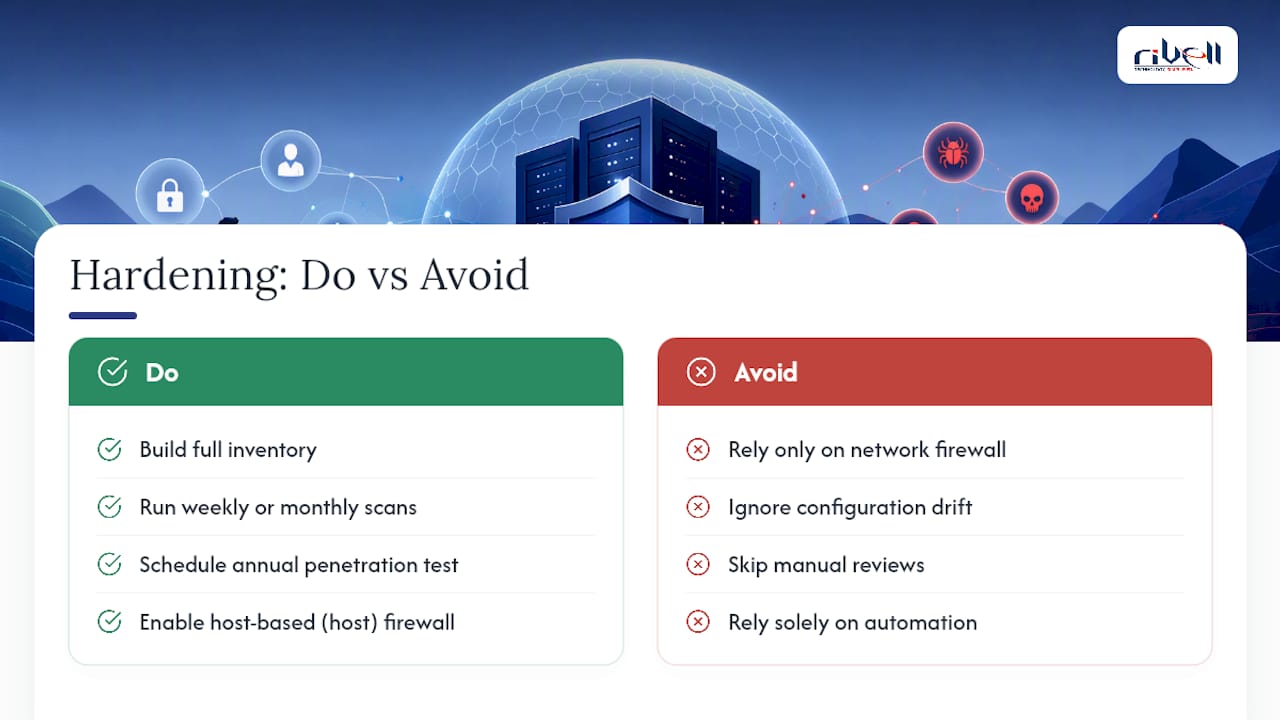
auditdon Linux, Advanced Audit Policy on Windows) so security-relevant events actually get captured, not just generic system noise. Retain logs long enough to satisfy your compliance framework. - Run automated compliance scans with tools like OpenSCAP, CIS-CAT, or Qualys on a weekly or monthly cadence, and schedule a full penetration test at least annually.
A step-by-step compliance workflow built around inventory, harden, validate, and maintain gives you a repeatable structure auditors recognize on sight, instead of a one-time project that quietly decays. A periodic IT security assessment catches the drift that slips past routine scans.
Pro Tip: Set your vulnerability scans to run automatically and email a diff report, not just a raw findings list. You want to know what changed since last scan, not re-read the same 400-line PDF every month.
How Do You Keep Servers Hardened Over Time?
A hardened server on day one and an unhardened one on day ninety look identical from the outside until something breaks. Configuration drift is the quiet failure mode of every manual hardening effort, which is why automation matters more than the initial checklist itself.
- Codify your hardening baseline in Ansible playbooks, PowerShell DSC configurations, or Chef/Puppet manifests, and version-control every change like application code.
- Automate your compliance scans and, where safe, your remediation workflows, and tie scan results into change management and your CMDB so nothing gets fixed off the books.
- Set a recurring cadence for re-running hardening checks, and document compensating controls explicitly for any legacy system that can’t meet the full baseline.
Automation is what turns a hardening checklist from a one-time event into a standard that actually holds.
How Do You Roll Out Hardening in 30 Days?
A realistic rollout beats a perfect one that never ships. Break it into three phases.
- Days 1 to 3: Build the inventory, snapshot current configs, lock down SSH and RDP, and patch every critical CVE on internet-facing systems first.
- Weeks 1 to 2: Apply host firewall rules, remove services you flagged as unnecessary during inventory, turn on log forwarding, and run your first baseline compliance scan.
- Weeks 3 to 4: Automate the repeatable steps, rerun validation scans, remediate whatever the scan flagged, and package the results into evidence your auditors can actually use.
Stage every change through a test environment first, schedule real maintenance windows, and always know your rollback path before you touch production. Rivell’s managed clients follow close to this exact sequence, and the servers that stall out are almost always the ones where “we’ll fix that service later” never gets revisited.
Pro Tip: Block time on your calendar for week four’s remediation pass before you start week one. Scan findings pile up fast, and without a scheduled slot, they sit open for months.
Do You Need a Backup Strategy for Hardened Servers?
Hardening reduces the odds of compromise. It doesn’t make you immune, and a ransomware event or failed patch can still take a server down regardless of how tightly it’s locked. Backups are what turn a disaster into an inconvenience.
Keep at least one backup copy offline or immutable, so an attacker who gets domain admin can’t simply delete or encrypt your recovery point along with production data. Follow a 3-2-1 structure: three copies of the data, on two different media types, with one stored offsite or in a separate cloud region.
Test restores on a schedule, not just when you need one. A backup nobody has restored from is a hope, not a plan. Confirm you can rebuild a full server, not just recover individual files, and time how long that takes. If a full restore takes eighteen hours and your recovery time objective is four, you have a gap to close before you need it for real.
Tie backup scope to the sensitivity tier you assigned during inventory. Domain controllers, database servers, and anything holding regulated data need tighter recovery point objectives (how much data loss is acceptable) than a low-traffic internal tool. Store backup credentials and encryption keys separately from the systems they protect, following the same principle you applied to admin accounts: no single compromised credential should unlock everything.
Does Physical Security Still Matter for Server Hardware?
Cloud migration has made this section feel optional to some teams. It isn’t, if you run anything on premises. Physical access to a server bypasses nearly every software control you just spent weeks implementing. Someone with a screwdriver and ten unsupervised minutes can pull a drive, reset a BIOS password, or plug in a device that captures everything typed on that console.

Restrict server room access to a documented list of personnel, and log every entry, ideally with badge access rather than a shared key. Cameras covering server room entry points are inexpensive insurance against exactly the scenario a locked door alone can’t fully prevent.
Lock rack units and disable unused physical ports (USB, console) on servers that don’t need them for daily operations. Environmental controls count too. Temperature, humidity, and power redundancy (UPS, backup generator) protect availability, which is as much a part of security as confidentiality. A server that overheats and shuts down mid-transaction has failed just as surely as one that got breached.
If you colocate or use a shared data center, confirm the facility’s own physical security controls (biometric access, 24-hour monitoring, visitor logs) meet your compliance requirements before you sign the contract, not after an audit asks for proof.
Should You Add IDS/IPS to Your Hardened Servers?
Firewalls and account controls stop known bad traffic patterns. An intrusion detection and prevention system catches the behavior that gets through anyway, the connection that technically matches an allow rule but doesn’t match how that server normally behaves.
Host-based intrusion detection (HIDS) tools like OSSEC or Wazuh monitor a specific server for suspicious file changes, unexpected process launches, and login anomalies, complementing the file integrity monitoring already on your Linux hardening list. Network-based systems (NIDS/NIPS) like Suricata or Snort watch traffic patterns across a segment, flagging port scans, known exploit signatures, and unusual data flows between hosts that firewall rules alone wouldn’t catch.
The distinction between detection and prevention matters operationally. An IDS alerts; an IPS can actively block traffic in real time. Prevention sounds like the obvious choice, but a misconfigured IPS can also block legitimate traffic and take down a service you need running. Most teams start with detection mode, tune out false positives over a few weeks, then move confirmed rule sets into active prevention.
Feed IDS/IPS alerts into the same SIEM you’re already using for log aggregation, rather than running it as a disconnected tool nobody checks. An alert that only appears in a separate console tends to go unread. Integration is what makes the investment pay off, turning isolated alerts into correlated incidents your team can actually act on.
What About Secure Boot and Firmware Protection?
Hardening the operating system doesn’t help if the firmware underneath it is compromised. Malware that infects the BIOS or UEFI firmware loads before the OS does, which means it can survive a full OS reinstall and stay invisible to most endpoint security tools.
Enable UEFI Secure Boot on every server that supports it, which verifies the digital signature of the bootloader and OS kernel before allowing them to load. This blocks a meaningful category of bootkit malware designed to run underneath your operating system’s own defenses.
Set a firmware/BIOS administrator password separate from your OS admin credentials, and disable boot from removable media on production servers, since that’s a common vector for physical-access attacks. Check firmware update advisories from your hardware vendor on the same cadence you check OS patches. Firmware vulnerabilities get disclosed less often than OS ones, but they tend to be more severe when they surface, precisely because they sit below the layer most security tools inspect.
For servers running virtualization, confirm hardware-based security features like Intel TXT or AMD’s equivalent trusted execution technology are enabled where your workload benefits from them. These validate the integrity of the boot chain from firmware through hypervisor, closing a gap that pure software hardening can’t reach on its own.
How Should You Encrypt Data at Rest and in Transit?
Encryption is the layer that limits the damage when every other control fails, whether that failure is a stolen drive, an intercepted network session, or a misconfigured backup left exposed. It’s not a substitute for the access controls covered earlier. It’s what protects the data if those controls get bypassed anyway.
For data at rest, BitLocker on Windows Server and LUKS on Linux both provide full-disk encryption, and both integrate with centralized key management (Active Directory for BitLocker, a dedicated key server or vault for LUKS) so a lost or stolen drive doesn’t hand over readable data. Database-level encryption adds a second layer for particularly sensitive tables, useful when you need field-level protection beyond whole-disk coverage.
For data in transit, enforce TLS 1.2 or higher on every service that accepts network connections, and disable older protocol versions (TLS 1.0, TLS 1.1, and definitely SSL) outright. Internal traffic between servers deserves the same standard as external traffic. Plenty of breaches spread laterally through east-west traffic that nobody thought to encrypt because “it’s internal.”
Manage certificates and encryption keys with the same rigor you apply to privileged credentials: centralized storage, defined rotation schedules, and no keys hardcoded into application configs or scripts.
What Should Your Incident Response Plan Cover?
A hardening checklist reduces how often you need an incident response plan. It doesn’t eliminate the need for one, and the servers most worth hardening are exactly the ones where an incident would hurt the most.
Document a response plan before you need it, covering these stages at minimum: detection (how an alert gets flagged and by whom), containment (isolating the affected server without destroying forensic evidence), eradication (removing the actual threat), recovery (restoring from the clean backups covered earlier), and a post-incident review that feeds lessons back into your hardening baseline.
Name specific people for specific roles. “The IT team will handle it” fails under pressure at 3 a.m. Know who has authority to take a production server offline, who contacts affected customers or regulators if required, and who documents the timeline for later review.
Test the plan with a tabletop exercise at least annually, walking through a realistic scenario (ransomware on a file server, a compromised admin account) without touching production. Plans that only exist on paper tend to reveal their gaps at the worst possible moment. Keep a copy accessible outside your normal network too. If the incident involves your primary systems, you don’t want your response plan locked inside the thing that’s compromised.
Author perspective: operational pitfalls and shortcuts
The gap that sinks most hardening efforts isn’t ignorance. It’s drift. Someone opens a port for a vendor demo and forgets to close it. That’s a change-control failure, not a knowledge failure, and no checklist fixes it without automation and scheduled re-verification behind it.
Canary rollouts (patch one server, watch it for 48 hours, then roll to the rest) preserve uptime while still moving fast. Chase a measurable reduction in exposed services and stale accounts each quarter, not a mythical perfect baseline. Perfect baselines don’t survive contact with a Tuesday afternoon vendor request.
How Rivell Helps You Maintain a Hardened Server Environment
Building this checklist once is manageable. Maintaining it across a growing server fleet, month after month, without a dedicated team watching for drift, is where most in-house efforts quietly slip. Rivell runs the ongoing work: continuous monitoring, tested patch management, configuration management that catches drift before an auditor does, SIEM integration for real-time alerting, and documented compliance evidence packages ready when a regulator or client asks for proof.
For a business balancing healthcare compliance, client data, or just a growing server count against a small internal IT team, that combination closes the gap between having a checklist and actually keeping every server aligned with it. Rivell’s managed IT services for small business build server oversight and security hardening into a single ongoing engagement rather than a project that ends the day the checklist gets checked off. Pair it with endpoint protection for the EDR and Defender layer this checklist calls for on every Windows server. If you want a clear picture of where your current environment stands, request a server security assessment from Rivell and get a prioritized remediation plan back, not just a findings report.
Standards and Tools Worth Bookmarking
Download baselines from CIS Benchmarks and NIST SP 800-123 directly, and validate with automated scanning tools like OpenSCAP or CIS-CAT.
Frequently Asked Questions
What is the first step in a server hardening checklist?
Build a full inventory of the server’s OS version, open ports, running services, and installed packages before making any changes. That baseline lets you measure progress and roll back safely if a change causes problems.
How often should I re-run hardening checks?
Run automated compliance scans weekly or monthly, and schedule a full penetration test at least once a year. Servers drift out of their hardened state faster than most teams expect, usually through routine changes nobody flagged as risky.
Is Windows Server hardening different from Linux hardening?
The principles (least privilege, minimal services, strong authentication, logging) stay the same. The tools differ: Group Policy and BitLocker for Windows Server, SSH configuration and sysctl kernel settings for Linux. Both map back to their respective CIS Benchmarks.
Do I need a firewall if my server is already behind a network firewall?
Yes. A host-based firewall is a second layer that stops lateral movement if an attacker breaches the network perimeter or compromises another server on the same segment. Network firewalls alone don’t protect against threats already inside the network.
Can automation fully replace manual hardening reviews?
Automation handles the repeatable steps (patch deployment, configuration enforcement, scan scheduling) reliably, but someone still needs to review findings, approve exceptions for legacy systems, and update the baseline as new threats emerge. Treat automation as the engine, not the whole process.
Sources
- NIST Special Publication 800-123: Guide to General Server Security
- CIS Benchmarks
- Microsoft security best practices for Windows Server (privileged access and hardening)
- Linux Server Hardening Checklist: 40+ Essential Steps To Secure Your Enterprise | LinuxTeck
- Server Hardening Checklist for SOC 2 & NIST
