
If you do one thing today, deploy phishing-resistant MFA across every attorney and staff account. AiTM phishing has become a leading method of initial access in the legal sector and bypasses standard MFA entirely, making FIDO2 security keys or passkeys the single highest-impact control you can enable right now. Law firms hold privileged communications, M&A details, and client financial data that commands high extortion value, which is exactly why attackers prioritize them.
Your immediate priorities:
- Enable phishing-resistant MFA (FIDO2 keys or passkeys) on all accounts
- Validate that backups are current, tested, and stored off-network
- Apply critical OS and application patches within 24 hours
- Deploy or confirm active email filtering and anti-phishing rules
- Confirm your endpoint detection and response (EDR) agent is running on every device
Table of Contents
- What does law firm cybersecurity look like in the first 72 hours?
- How do you run a quick risk assessment at your firm?
- Policies, access controls, and training that actually reduce breaches
- What technical controls does a law firm actually need?
- How do you build an incident response plan that holds up?
- What are U.S. law firms’ ethical duties around cybersecurity?
- What should you budget for assessment, remediation, and managed services?
- How do you choose a managed IT or vCISO partner for your firm?
- Key Takeaways
- The part of law firm security most firms get wrong
- How Rivell helps law firms protect client data
- Useful sources and further reading
What does law firm cybersecurity look like in the first 72 hours?
The first three days are about closing the doors attackers walk through most often. Work through this checklist in priority order.
MFA and authentication. Inventory authentication protocols, Conditional Access, MFA methods, administrator accounts, service identities, and tenant-bound applications. During a merger, divestiture, or domain consolidation, use a documented Microsoft 365 tenant-to-tenant migration plan to map source identities and prove target access before retiring the source configuration.
Patching. Pull a list of unpatched critical and high-severity vulnerabilities across Windows, macOS, browsers, and your practice management platform. Anything rated CVSS 9.0+ gets patched or isolated within 24 hours.
EDR health check. Log into your EDR console and confirm every managed endpoint shows an active, current agent. Gaps here are blind spots.
Email filtering. Verify DMARC, DKIM, and SPF records are published and enforced. Enable impersonation protection for your firm’s domain and any client domains you regularly communicate with.
Remote access. Audit VPN and remote desktop access. Disable any accounts that belong to former employees or vendors no longer active. Require MFA on all remote sessions.
Pro Tip: Create a written IT-request verification policy today. Any request to reset credentials, grant access, or install software must be confirmed via a second channel (a phone call to a known number, not a reply to the same email thread). The Silent Ransom Group has sent associates in person to attach storage devices to workstations when remote tactics failed, so this policy extends to physical office access too.
How do you run a quick risk assessment at your firm?
You do not need a six-month engagement to know where your biggest exposures are. A focused one-to-two-week sprint covers the ground that matters.

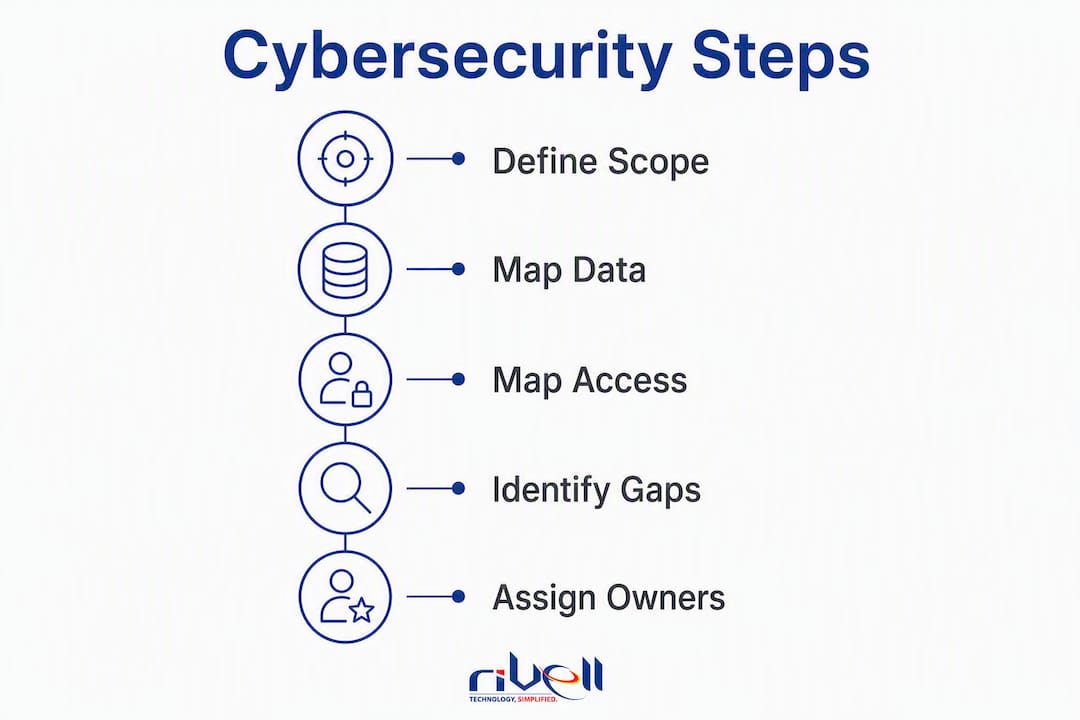
Step 1. Define scope. Limit the first pass to five repositories: practice management system, document management system, email platform, cloud storage (OneDrive, SharePoint, Google Drive), and backup infrastructure.
Step 2. Map data sensitivity. For each repository, identify what categories of data live there (privileged communications, financial records, PII, health information) and which matters are highest-value.
Step 3. Map access. Who has access to each system, at what permission level, and is that access still current?
Step 4. Identify gaps. No MFA, no encryption, no backup, shared credentials, and stale accounts are the most common findings.
Step 5. Assign owners and a remediation timeline. Each gap gets a named owner and a due date.
Use this table as your working document:
| System | Data Type | Sensitivity | Who Has Access | MFA Enabled | Encrypted | Backup Verified |
|---|---|---|---|---|---|---|
| Practice management | Client matters, billing | High | All attorneys, admin | Yes/No | Yes/No | Yes/No |
| Document management | Pleadings, contracts | High | Matter team only | Yes/No | Yes/No | Yes/No |
| Email platform | All communications | High | All staff | Yes/No | Yes/No | Yes/No |
| Cloud storage | Shared files, templates | Medium | All staff | Yes/No | Yes/No | Yes/No |
| Backup system | All firm data | Critical | IT/admin only | Yes/No | Yes/No | Yes/No |
Policies, access controls, and training that actually reduce breaches
Industry experts consistently note that firms that treat cybersecurity as purely an IT problem leave their people and process controls wide open. The human layer is where most breaches start.
Principle of Least Privilege. Every account should have access only to the systems and data required for that person’s role, nothing more. In practice: attorneys access only their active matters, paralegals access only assigned files, and no one has standing admin rights on their daily-use account. Run a quarterly access review to catch drift.
Onboarding and offboarding. Build a checklist that IT executes on day one and day last. New hires get provisioned accounts with role-appropriate access only. Departing employees have all accounts disabled within one hour of their last day, credentials rotated on shared systems, and access logs reviewed for unusual activity in the prior 30 days.
Training cadence. The ABA recommends annual cybersecurity awareness training, but annual-only is insufficient. Run phishing simulations quarterly. Any staff member who clicks gets immediate remedial training, not a reprimand. Add a short briefing whenever a new threat targeting law firms makes the news.
Pro Tip: Post a laminated one-page verification policy at every reception desk and in every conference room. It should state: “We will never ask you to grant remote access or attach a device to a workstation without a confirmed phone call to a known IT number.” Physical reminders work.
What technical controls does a law firm actually need?
The baseline is not complicated, but the details matter.
Identity and MFA. Standard TOTP authenticator apps do not stop AiTM attacks. FIDO2-compliant security keys or passkeys, combined with conditional access policies tied to device posture, are the only reliable defense against this vector. Pair this with conditional access rules that block sign-ins from unexpected geographies or unmanaged devices.
Endpoint detection and response. EDR goes beyond antivirus. It records process behavior, detects lateral movement, and gives your security team forensic telemetry when an incident occurs. Every managed device needs it.
Encryption. Only 49% of firms in the ABA survey reported using file encryption, and just 40.1% had email encryption available. Both are table stakes. Encrypt laptops with BitLocker or FileVault, encrypt email with Microsoft 365’s built-in options or a dedicated gateway, and confirm cloud storage is encrypted at rest.
Network segmentation and monitoring. Separate guest Wi-Fi from the firm network. Isolate any legacy systems that cannot be patched. Deploy a SIEM or log aggregation tool so that stealthy exfiltration attempts generate alerts rather than going unnoticed for weeks. Rivell’s continuous monitoring covers this layer for firms that do not have in-house security operations.
Backups. Follow the 3-2-1 rule: three copies, two different media types, one off-site or air-gapped. Test a full restore at least quarterly. A backup you have never restored is a backup you cannot trust.
| Control | Purpose | Quick Validation | Typical Owner |
|---|---|---|---|
| Phishing-resistant MFA | Stops AiTM credential theft | Check identity provider enrollment report | IT/MSP |
| EDR | Detects and contains endpoint threats | Confirm agent status in console | IT/MSP |
| Email filtering (DMARC/DKIM/SPF) | Blocks spoofed and phishing email | Run MXToolbox DMARC check | IT/MSP |
| File and email encryption | Protects data at rest and in transit | Audit BitLocker/FileVault status | IT/MSP |
| SIEM/log aggregation | Detects stealthy exfiltration | Confirm log ingestion and alert rules | IT/MSP |
| Immutable backups | Enables recovery without paying ransom | Run a test restore | IT/MSP |
How do you build an incident response plan that holds up?
Most firms have no documented IR plan. A minority of law firms held a formal incident response plan in eSentire’s data. That gap is expensive when something goes wrong.
Your IR plan needs five components: defined roles (who declares an incident, who leads response, who communicates externally), an escalation path, forensic preservation steps, client notification triggers, and a recovery checklist.
First 24 hours after detection:
- Isolate the affected system from the network without powering it off (preserves volatile memory).
- Preserve logs from your SIEM, email platform, and identity provider before they roll over.
- Engage outside counsel immediately to protect the investigation under attorney-client privilege.
- Engage a forensic firm or your managed provider’s IR team to assess scope.
- Notify your cyber insurance carrier per your policy’s reporting window.
- Document every action taken with timestamps.
Recovery validation. Before restoring from backup, confirm the backup predates the intrusion. Restore to an isolated environment first, verify data integrity, then cut over. Never restore directly onto a potentially compromised system.
Tabletop exercises. Run one tabletop per year at minimum, two if your firm handles high-value matters. Scenarios should include a ransomware event, a credential compromise, and a physical intrusion (relevant given FBI warnings about the Silent Ransom Group).
Pro Tip: Keep a printed IR contact card in a physical binder, not just on the network. If your systems are locked, you still need the phone numbers for your forensic firm, outside counsel, and insurance carrier.
What are U.S. law firms’ ethical duties around cybersecurity?
Cybersecurity is not optional for lawyers. ABA guidance frames it as a legal and ethical obligation rooted in the duty of confidentiality under Model Rule 1.6 and the duty of competence under Model Rule 1.1. Most state bars have issued guidance that tracks or extends these standards.
What this means in practice:
- Documented security policies are required, not aspirational.
- Annual cybersecurity training must be recorded and retained.
- Third-party assessments are increasingly expected by both state bars and insurance carriers.
- Client notification obligations vary by state breach-notification law; know your jurisdiction’s trigger and timeline before an incident occurs.
- Preserve privilege by routing breach investigations through outside counsel from day one.
Cyber insurance carriers now treat these requirements as underwriting conditions. Carriers commonly require documented policies, annual training, and independent vulnerability assessments at renewal. Firms that cannot produce evidence of these controls may face coverage gaps or higher premiums.
This is general information, not legal advice. Consult your firm’s counsel and your state bar for jurisdiction-specific obligations.
What should you budget for assessment, remediation, and managed services?
Costs vary by firm size, current state, and scope, but these ranges give you a planning baseline.
| Phase | Typical Scope | Rough Cost Range | Timeline |
|---|---|---|---|
| Baseline risk assessment | Gap analysis, data mapping, policy review | — | 2–4 weeks |
| Prioritized remediation | MFA, EDR, encryption, patching, policy docs | — | 4 weeks |
| Managed IT/vCISO services | Continuous monitoring, IR support, compliance | — | Ongoing |
| Cyber insurance premium impact | Varies by coverage limits and firm size | Varies | Annual |
Cyber insurance is now a budget driver, not just a line item. Carriers may condition coverage on completing remediation within a defined timeline. Firms that complete a third-party assessment and implement documented controls typically see better premium terms than those that cannot demonstrate compliance. See Rivell’s managed IT pricing for current cost-shape guidance.
How do you choose a managed IT or vCISO partner for your firm?
The right partner understands law-firm confidentiality obligations, not just generic IT. Ask every candidate these questions:
- Do you have current law-firm clients, and can you provide references?
- What is your documented incident response SLA (time to detect, time to contain, time to remediate)?
- How do you handle forensic evidence preservation to support privilege?
- What monitoring tools do you use, and how are alerts escalated after hours?
- Who owns firm data if the relationship ends, and what does your offboarding process look like?
Red flags to walk away from: no documented IR policy, no breach-response capability, no experience with legal or regulated industries, and a one-size-fits-all contract with no SLAs.
A 90-day pilot is a reasonable way to evaluate fit. Success looks like: all endpoints enrolled in EDR, MFA fully deployed, at least one tabletop exercise completed, and a written risk assessment delivered. If a provider cannot hit those milestones in 90 days, they will not hit harder ones later.
Rivell’s vCISO services are built around exactly this model, with documented SLAs, forensic support, and law-firm-specific onboarding.
Key Takeaways
Effective law firm cybersecurity requires phishing-resistant MFA, tested backups, documented policies, and a managed partner with legal-sector experience and documented incident response SLAs.
| Point | Details |
|---|---|
| Deploy phishing-resistant MFA first | AiTM attacks account for 28.57% of legal-sector intrusions; FIDO2 keys or passkeys stop this vector. |
| Map your data before you remediate | Know what sensitive data you hold, where it lives, and who accesses it before spending on controls. |
| Encryption gaps are widespread | Only some firms use file encryption per ABA data; encrypt endpoints and email is recommended. |
| IR plan and tabletop exercises | Only 34% of law firms have a formal IR plan; build one and test it with at least one tabletop per year. |
| Rivell for law-firm managed IT | Rivell provides continuous monitoring, incident response SLAs, and vCISO services tailored to law firms in New Jersey. |
The part of law firm security most firms get wrong
Most law firms approach cybersecurity the same way they approached fire safety in 1995: install a smoke detector, check the box, move on. The problem is that a smoke detector does not call the fire department, and a basic antivirus does not detect an attacker who has been quietly exfiltrating client data for three weeks.
The shift that matters is from perimeter thinking to detection thinking. Attackers are already inside more often than firms realize. The legal sector recorded an 86% intrusion ratio where attacks progressed into active intrusion. That means the question is not just “how do we keep them out?” but “how quickly will we know when they get in?”
Firms that invest in continuous monitoring and a tested IR plan recover faster, pay lower ransoms (or none), and retain client trust. Firms that do not are essentially betting that they will not be the one in the news. That is not a strategy.
How Rivell helps law firms protect client data
Law firms in New Jersey have a concrete alternative to building a security program from scratch: a managed IT partner with over 25 years of experience in regulated industries and a purpose-built approach to legal-sector confidentiality requirements.
Rivell takes full ownership of your IT environment, from continuous monitoring and EDR management to incident response and vCISO advisory services. That means documented SLAs, forensic-ready logging, and a team that understands ABA confidentiality obligations, not just generic compliance frameworks. Firms that engage Rivell get a baseline risk assessment, prioritized remediation, and ongoing monitoring without hiring a full-time security team.
The next step is straightforward: contact Rivell for a short risk assessment and a 90-day security sprint scoped to your firm’s size and current state.
Useful sources and further reading
These are the primary sources cited in this guide. Each is worth bookmarking for internal briefings or compliance documentation.
- ABA Technology Report: Cybersecurity for Law Firms — The ABA’s annual survey of law-firm security practices. Covers encryption adoption rates, IR plan prevalence, training requirements, and insurer expectations. Essential for compliance documentation.
- AiTM Phishing Becomes Top Initial Access Threat to Law Firms (Infosecurity Magazine) — Reports eSentire’s finding that AiTM attacks account for 28.57% of legal-sector initial access events and that 86% of intrusions progressed to active compromise. Use this to justify phishing-resistant MFA to firm leadership.
- FBI Warning: Silent Ransom Group Targeting U.S. Law Firms (CyberScoop) — FBI alert on hybrid social-engineering tactics including in-person device attachment. Directly relevant to physical access controls and verification policies.
- The Cyber Threat Law Firms Can’t Afford to Ignore (NFP) — Explains why law firms are high-value targets and how extortion economics drive attacker behavior. Useful for board-level briefings.
- Best Practices for Law Firms to Meet Cybersecurity Obligations (ALANET) — Practical operational guidance from the Association of Legal Administrators covering policy, training, and vendor management.
